Most people do not buy the first time they encounter a business.
They may watch a product demonstration, visit a service page, compare alternatives, read reviews and then leave without taking action. This does not necessarily indicate a lack of interest. The prospect may need more information, stronger evidence, a better offer or simply more time.
YouTube remarketing allows advertisers to reconnect with these warmer audiences using video advertising. Instead of showing the same generic advert to everyone, you can tailor the message according to what people already know about your business and where they are in the buying journey.
A website visitor might receive a video answering common objections. Someone who watched a product demonstration could see a customer case study. An existing customer could receive an advert introducing a complementary service.
Used properly, YouTube remarketing is more than repeatedly displaying adverts to previous visitors. It is a way to continue a sales conversation through video.
What Is YouTube Remarketing?
YouTube remarketing—also called YouTube retargeting—is the practice of using previous interactions with your business to inform who sees your advertising.
Google now generally describes remarketing lists as your data segments. Depending on the data available and the campaign type, these segments can include people who have:
Visited your website.
Viewed particular pages.
Started but did not complete an enquiry or purchase.
Watched videos from your YouTube channel.
Subscribed to your channel.
Interacted with eligible YouTube content.
Used your mobile app.
Previously submitted an enquiry.
Purchased from your business.
Been added to an eligible Customer Match list.
The audience can then be used with video adverts across YouTube and other eligible Google inventory.
For a wider explanation of the channel, see our complete guide to YouTube Ads.
Why YouTube Is Well Suited to Remarketing
Search advertising is excellent at capturing existing intent. Someone searches for a product, service or solution and an advert appears at the moment of demand.
YouTube performs a different role. It gives advertisers more time and creative freedom to explain, demonstrate and persuade.
A video can:
Show a product in use.
Explain a complicated service.
Introduce the people behind a business.
Demonstrate expertise.
Present customer evidence.
Address a common concern.
Compare different options.
Reinforce a brand’s value proposition.
This makes video particularly useful when a prospect understands the general offer but is not yet ready to enquire or purchase.
Someone who has already visited your website does not necessarily need another broad introduction. They may need an explanation of your process, evidence that the service works or reassurance that your business is credible.
YouTube remarketing provides an opportunity to deliver that next message.
How YouTube Remarketing Works
YouTube remarketing has four connected components:
A source of eligible first-party audience data.
An audience segment created in Google Ads.
A campaign capable of using that segment.
Suitable advertising creative and conversion measurement.
For YouTube engagement audiences, the YouTube channel must first be linked to the relevant Google Ads account. Google Ads can then create audience segments from eligible interactions with the linked channel or specific videos.
Website audiences normally use the Google tag, Google Tag Manager or eligible Google Analytics audiences shared with Google Ads. Customer Match uses consented first-party information supplied by the advertiser.
Google then attempts to recognise eligible users when they use YouTube or other compatible Google services. The available reach will usually be lower than the total number of website visitors or video views because not every interaction can be matched or used for personalised advertising.
This is why YouTube Analytics views, Google Analytics users and Google Ads audience sizes rarely match exactly.
YouTube Remarketing Is Not Just Based on Cookies
Describing modern remarketing as a cookie following someone around the internet is now too simplistic.
Google Ads can use several types of permitted signals and first-party data, depending on the audience source, user settings, consent status and campaign configuration. These can include:
Eligible YouTube account interactions.
Google tag data.
Google Analytics audiences.
App activity.
Customer Match data.
Signed-in Google user activity.
Consented first-party customer information.
Advertisers must still obtain the required consent and comply with Google’s personalised advertising policies.
For UK advertisers, a suitable consent-management platform should collect the user’s choices, while Google Consent Mode communicates those choices to Google tags. Consent Mode does not provide the cookie banner itself and does not replace the need for a compliant consent process.
Types of YouTube User Segments
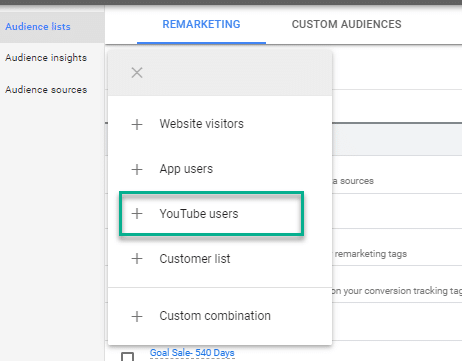
After linking a YouTube channel to Google Ads, advertisers can create segments based on several eligible interactions.
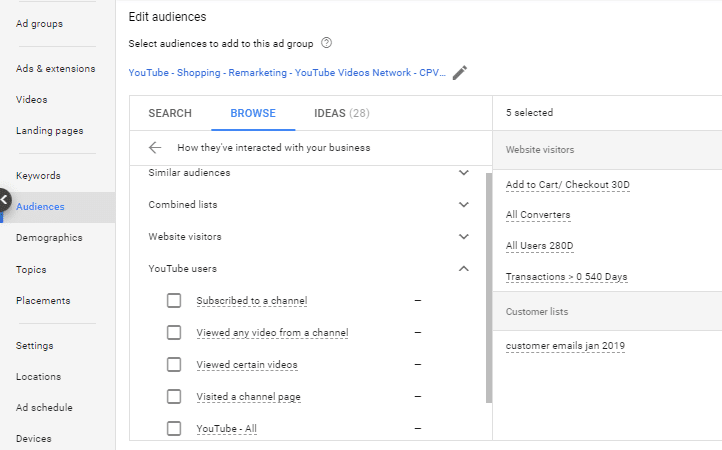
Google currently documents YouTube user segments for people who have:
Viewed any video from a channel.
Viewed selected videos.
Subscribed to a channel.
Visited the channel homepage.
Liked a video from the channel.
Added a video from the channel to a playlist.
These can include eligible organic and advertising views.
Some interactions historically available for YouTube remarketing are no longer used in the same way. For example, Google states that data from people sharing a video is no longer used for these segments. Advertisers should therefore check the current options inside Audience Manager rather than relying on an old list of YouTube interactions.
Google also applies technical eligibility rules. Views from bumper adverts and non-skippable in-stream adverts cannot currently be used to create these YouTube data segments. Google states that video adverts should be at least 11 seconds long to add viewers to remarketing lists, while an eligible view must reach 10 seconds.
These details matter when a campaign is expected to build an audience for subsequent advertising.
Website Visitor Audiences
You do not need an established YouTube channel audience to advertise to previous website visitors on YouTube.
Website audiences can include:
All website visitors.
Visitors to important service or product pages.
People who viewed pricing.
Visitors who reached a booking page.
Users who started a form.
Basket or checkout abandoners.
Previous converters.
Visitors referred by a particular campaign or channel.
An “all visitors” audience can provide useful scale, but it treats casual readers and high-intent prospects as though they were equally valuable.
A visitor who read one introductory article should usually receive a different message from someone who reached the checkout, pricing or contact page.
This is where a considered Google Ads Audience Manager structure becomes important. Audience segmentation should reflect meaningful commercial intent without dividing the available data into so many small lists that none can serve.
Customer Match and CRM Audiences
YouTube can also be used to reach eligible contacts from a customer database through Google Customer Match.
Depending on the available data and compliance requirements, Customer Match may use consented information such as:
Email addresses.
Telephone numbers.
Names.
Country and postcode data.
The uploaded information is processed by Google and matched against eligible users. Not every record will match, so a database containing 10,000 contacts will not necessarily produce an audience of 10,000 people.
Customer Match can support strategies such as:
Re-engaging unconverted sales leads.
Promoting renewals.
Introducing complementary services.
Reaching previous customers with new products.
Excluding existing customers from acquisition campaigns.
Separating higher-value customers from low-value purchasers.
The quality of the underlying CRM data matters more than simply uploading every contact available. A mixed list containing customers, suppliers, employees, job applicants and poor-quality leads gives Google an unclear commercial signal.
Our Google Customer Match guide explains how these first-party audiences can be structured and maintained.
Minimum Audience Sizes
An audience segment must contain enough eligible active users before adverts can serve.
Google currently states that YouTube audiences generally need at least 100 active users within the previous 30 days. Similar minimums apply to several other eligible Google networks, although compatibility and requirements can vary by list source.
The number shown in Google Ads can be substantially smaller than:
Total YouTube video views.
Total website sessions.
Total Google Analytics users.
The number of records in a CRM.
The number of people who completed an action.
Possible reasons include consent choices, user eligibility, expired membership duration, account matching, personalised advertising settings and platform privacy controls.
New segments can also take time to populate. Google advises allowing approximately 48 to 72 hours in some cases.
For smaller businesses, creating ten highly specific lists may leave every list too small to use. It can be better to begin with a few commercially meaningful segments and divide them further as the available audience grows.
A Practical Audience Structure
A useful starting structure could include:
All Eligible Website Visitors
This is the broadest remarketing audience. It can provide reach but should not automatically receive the highest budget.
High-Intent Website Visitors
Include people who visited pricing, product, booking, quote or contact pages. These visitors have usually shown stronger commercial interest.
Unconverted Leads
These are people who enquired but have not yet become qualified opportunities or customers. A CRM or Customer Match connection may be needed to maintain the segment accurately.
YouTube Viewers
Separate viewers of educational, product, service or case-study videos where audience volumes allow.
Existing Customers
Use this segment for retention, renewals, upgrades and cross-selling—or exclude it from acquisition campaigns.
Recent Purchasers or Completed Enquiries
Excluding recent converters prevents an acquisition advert from continuing to ask someone to complete an action they have already taken.
Match the Advert to the Audience
The greatest advantage of remarketing is not merely better targeting. It is the ability to change the message.
If every segment sees the same generic brand video, much of the strategic value is lost.
A useful creative framework is:
Cold or Lightly Engaged Visitors
Explain the problem, establish relevance and introduce the business. Avoid assuming that the viewer remembers the previous interaction.
Product or Service Page Visitors
Demonstrate the offer, clarify the process and explain why the business is different.
Pricing or Contact Page Visitors
Address the objections that may have prevented the enquiry. These could include cost, implementation time, contractual commitment, risk or uncertainty about what happens next.
Unconverted Leads
Use case studies, testimonials, demonstrations and frequently asked questions. The objective is to help the prospect make a decision—not to treat them as a completely new visitor.
Existing Customers
Promote relevant additions, upgrades, renewals or educational content that increases customer value.
The closer someone is to a commercial decision, the more specific the advert should become.
YouTube Remarketing Creative Best Practices
Remarketing does not rescue weak creative. A precisely targeted advert can still fail if it is slow, generic or irrelevant.
Establish Relevance Immediately
The opening seconds must give the viewer a reason to continue watching. Begin with the problem, desired outcome, important objection or recognisable situation.
Lengthy animated logos and general company introductions normally waste the most valuable part of the advert.
Design for Sound On and Sound Off
YouTube is fundamentally a video and audio platform, but captions and visible text still improve comprehension and accessibility. The message should remain understandable if the viewer does not hear every word.
Create Multiple Aspect Ratios
Horizontal video remains important for traditional in-stream placements, but vertical and square creative can perform more naturally across mobile feeds and YouTube Shorts.
Avoid simply cropping a horizontal advert into a vertical frame. Recompose it so that the presenter, product, captions and call to action remain clear.
Use Specific Proof
“Excellent service” is weak evidence. Stronger proof could include:
A quantified customer result.
A recognisable case study.
A product demonstration.
An explanation of the implementation process.
A relevant accreditation.
A genuine customer review.
A comparison that helps the viewer make a decision.
Give Each Advert One Main Job
A single advert should not attempt to explain the company, demonstrate every service, answer every objection and promote several calls to action.
Choose the next step appropriate to that audience.
Refresh Creative Before It Becomes Irritating
Small remarketing audiences can see the same advert repeatedly. Monitor reach, frequency, cost, conversion rate and performance over time.
Declining response can indicate creative fatigue, an exhausted audience or excessive repetition.
Choose the Right Campaign Type
YouTube inventory can be accessed through more than one type of Google Ads campaign.
The right choice depends on whether the objective is controlled video reach, views, direct conversions or multi-format demand generation.
Video Campaigns
Video campaigns can be used for objectives including reach, views, engagement and conversions.
Depending on the selected objective and subtype, bidding may include:
Target cost per thousand impressions.
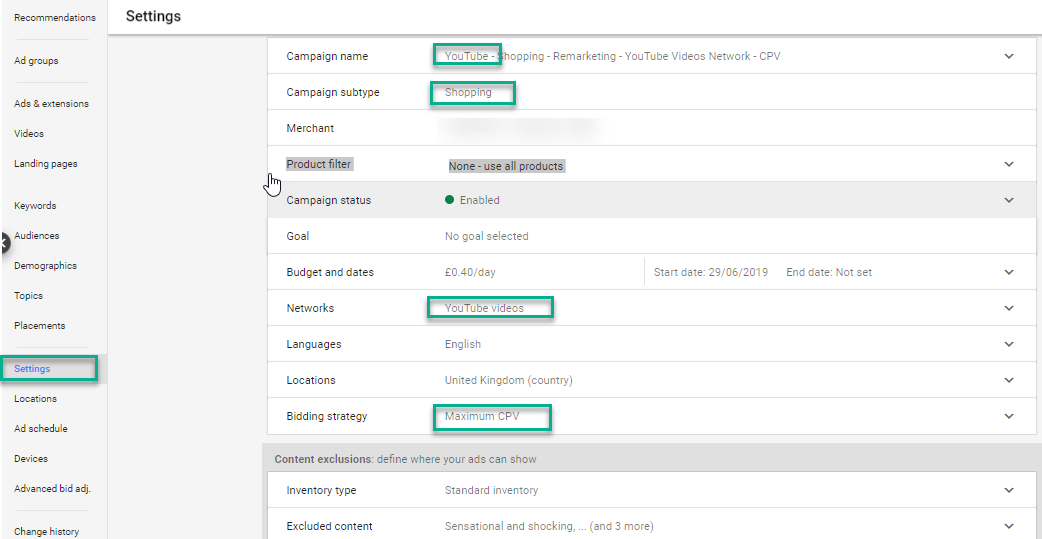
Maximum or target cost per view.
Maximise Conversions.
Target CPA.
Cost-per-view bidding is therefore not the only way to buy YouTube advertising. It is primarily relevant when the goal is to generate video views or interactions. Conversion-focused campaigns use conversion-based bidding where eligible.
Demand Gen Campaigns
Demand Gen campaigns can combine video, image and product creative across YouTube and other eligible Google surfaces, including Discover, Gmail, Maps and Display Network inventory.
This can be useful when the objective is to re-engage an audience through more than one visual format.
However, advertisers should check whether optimised targeting is enabled. Optimised targeting can use an audience segment as a starting signal and then reach people outside it when Google predicts that doing so will produce conversions.
That may be useful for prospecting, but it changes the nature of a strict remarketing campaign. If the intention is to measure performance only among previous visitors or customers, expansion settings must be reviewed carefully.
Performance Max
Your data segments can be supplied to Performance Max as audience signals, but these signals are not strict targeting boundaries. Performance Max can advertise beyond the supplied audience when Google’s systems predict that other users may convert.
Performance Max may use remarketing information, but it should not be reported as though every impression or conversion came exclusively from the remarketing list.
This distinction is particularly important when evaluating incremental value.
Avoid Over-Layering the Targeting
Audience targeting can become too restrictive.
If you combine a small remarketing segment with narrow demographics, topics, keywords and additional audience requirements, the resulting reach may be extremely limited.
In many Google Ads configurations, multiple targeting conditions are applied together. This means the person must satisfy all the selected requirements rather than just one of them.
For a dedicated remarketing campaign, the first-party audience itself is often the most meaningful restriction. Add other limitations only when there is a clear commercial reason.
Location, language, device, placement and brand-safety settings should still be reviewed, but unnecessary audience layers can prevent the campaign from gathering sufficient impressions or conversions.
Use Exclusions to Protect Budget
Exclusions are just as important as inclusion lists.
Depending on the campaign objective, useful exclusions may include:
Existing customers from new-customer campaigns.
Recent purchasers.
Completed lead forms.
Employees and internal users.
Job applicants.
Existing sales opportunities where advertising would add little value.
Users who have already completed the promoted action.
Irrelevant geographical areas.
Unsuitable placements and content categories.
For lead-generation businesses, exclusion logic should reflect the CRM lifecycle. Someone who has already become a customer should not continue receiving “request a quote” advertising simply because the website conversion tag failed to recognise the later sale.
Select a Sensible Membership Duration
Membership duration determines how long an eligible person remains in an audience segment.
Google permits YouTube user segments with membership durations of up to 540 days, but the maximum is not automatically the most appropriate setting.
A suitable duration depends on the buying cycle.
A household emergency service may have a very short decision window. A considered B2B purchase, expensive professional service or major software implementation may take several months.
Possible structures include:
Recent high-intent visitors.
Medium-term researchers.
Long-term prospects.
Previous customers eligible for renewal.
Lapsed customers.
Avoid selecting a long duration simply to make the audience larger. Someone who viewed one video many months ago may no longer have any relevant buying intent.
Build a Video Sequence
Remarketing is often more effective when several adverts perform different roles.
A simple sequence might include:
A short reminder of the problem and value proposition.
A demonstration or explanation.
A customer case study.
An objection-handling video.
A direct offer or call to action.
The sequence should advance the buyer’s understanding rather than repeat the same advert with minor visual changes.
For complex or expensive purchases, this approach can support the research and consideration period. For straightforward ecommerce purchases, a shorter sequence focused on the product, evidence and offer may be more appropriate.
See our broader YouTube advertising tips for guidance on formats, creative and optimisation.
Set Frequency Controls Carefully
Remarketing audiences are usually smaller than prospecting audiences. Without appropriate controls, the same people may receive a disproportionate number of impressions.
High frequency is not automatically bad. Considered purchases may require repeated exposure. The problem is repetition without additional value.
Review:
Unique reach.
Average frequency.
Frequency distribution where available.
Conversion rate by time period.
Cost per conversion.
Creative-level performance.
Audience saturation.
Changes after introducing new adverts.
Where campaign settings support frequency caps, use them according to audience size, buying cycle and creative variety. A campaign with several useful messages can normally sustain more exposure than one that repeats a single advert.
Measure Commercial Outcomes, Not Just Video Views
Views, view rate and cost per view help explain how people respond to the creative. They do not, by themselves, prove commercial success.
A remarketing campaign should be assessed against its objective.
For lead generation, useful measures may include:
Enquiries.
Qualified leads.
Booked appointments.
Sales opportunities.
Customers.
Cost per qualified lead.
Cost per customer.
Revenue and profit.
For ecommerce, measures may include:
Purchases.
Conversion value.
Return on advertising spend.
New-customer revenue.
Gross profit.
Repeat purchases.
Basket value.
Ensure that Google Ads conversion tracking is configured before asking automated bidding to optimise the campaign.
For service businesses, the initial form submission may be only the beginning of the sales process. CRM outcomes and Enhanced Conversions for Leads can help connect advertising activity with qualified prospects, customers and revenue.
Be Careful With Attribution
Remarketing often targets people who were already more likely to convert. This can make reported results appear exceptionally strong even when some customers would have returned without seeing another advert.
Google Ads may report click-through, engaged-view and view-through influence depending on the campaign, advert format, conversion settings and attribution rules.
These metrics can be useful, but they should not all be treated as equivalent.
A user who deliberately clicks an advert and purchases provides different evidence from someone who receives an impression and converts through another route.
For larger campaigns, consider testing incrementality through:
Geographic testing.
Audience holdouts where technically available.
Controlled campaign pauses.
Conversion-lift studies where eligible.
Comparing exposed and unexposed trends.
Analysing assisted and direct conversions separately.
The purpose is not to dismiss view-based influence. Video can shape demand without generating an immediate click. The objective is to avoid automatically assigning full credit to every conversion that occurs after an advert was shown.
Common YouTube Remarketing Mistakes
Using One Audience for Everyone
A blog reader, pricing-page visitor, previous customer and unconverted sales opportunity are not at the same stage of the buying journey.
Repeating the Original Advert
Remarketing should move the conversation forward. Showing the same introductory advert again may add frequency without adding persuasion.
Creating Too Many Small Segments
Excessive segmentation can leave each audience below the serving threshold and prevent the campaign from learning.
Ignoring Expansion Settings
Optimised targeting and audience signals may allow campaigns to reach beyond the selected segment. That can be useful, but it must be understood and reported correctly.
Optimising for Weak Conversions
If Google Ads is instructed to maximise page visits, short video engagements or low-quality form submissions, it may find more of those actions without improving sales.
Failing to Exclude Customers
Continuing to advertise an acquisition offer after someone purchases wastes budget and creates a poor customer experience.
Relying on CPV Alone
A cheap video view is not necessarily a valuable business result. The campaign should be evaluated against its actual objective.
Neglecting Consent and Policy Requirements
Audience data must be collected, processed and activated in accordance with applicable privacy requirements and Google’s personalised advertising policies. Some sensitive categories face additional restrictions.
How to Set Up YouTube Remarketing in Google Ads
The precise interface changes over time, but the underlying setup remains consistent.
Link the YouTube Channel
Connect the correct YouTube channel to the Google Ads account and grant the required data-segment permissions.
Confirm Audience Sources
Check the Google tag, Google Analytics connection, app data or Customer Match source required for the strategy.
Create the Audience Segments
In Google Ads, open Audience Manager and create the required YouTube user, website visitor, app user or customer segments.
Use clear names that identify:
The data source.
The behaviour.
The membership duration.
Important inclusions or exclusions.
The intended lifecycle stage.
Check Segment Eligibility
Allow time for new lists to populate and confirm that they contain enough active eligible users for the intended network.
Select the Campaign Type
Choose Video or Demand Gen according to the business objective, required creative formats, bidding approach and desired inventory.
Add Audiences and Exclusions
Confirm whether the audience is being applied as strict targeting, an observation audience or an automated campaign signal.
Review Expansion Controls
Decide whether the campaign should remain focused on existing audiences or expand to new users.
Configure Conversion Goals
Use conversion actions that represent meaningful commercial results. Remove irrelevant account-default goals from the campaign where appropriate.
Launch Multiple Creative Variants
Test different openings, messages, proof points, lengths and formats. Avoid changing too many variables simultaneously if you need to understand why performance changed.
Evaluate Lead and Revenue Quality
Use CRM data, ecommerce revenue and offline sales outcomes—not only platform engagement metrics—to decide whether the campaign is profitable.
When YouTube Remarketing Works Best
YouTube remarketing is particularly valuable when:
The purchase requires explanation or education.
Prospects compare several providers.
The product benefits from a demonstration.
The service has a longer sales cycle.
Website traffic is sufficient to build usable audiences.
The business has strong case studies or proof.
Customer lifetime value supports repeated advertising.
CRM data can distinguish leads from genuine sales opportunities.
Search and social campaigns already generate traffic that can be re-engaged.
It can be less effective when the audience is extremely small, the buying decision is immediate, conversion tracking is weak or the available video creative does not answer the prospect’s next question.
Is YouTube Remarketing Worth Using?
YouTube remarketing can be one of the most persuasive parts of a Google Ads strategy because it combines first-party audience knowledge with the explanatory power of video.
Its value does not come from following every visitor for as long as possible. It comes from identifying commercially meaningful audiences, understanding what is preventing them from acting and presenting the right message at the right stage.
A strong implementation connects:
Accurate audience data.
Appropriate consent.
Clear audience segmentation.
Relevant video creative.
Controlled campaign targeting.
Reliable conversion tracking.
CRM or ecommerce revenue outcomes.
Careful attribution.
When these elements work together, YouTube remarketing can convert previous awareness into renewed consideration—and renewed consideration into measurable leads, customers and revenue.