
Google Display advertising can reach potential customers across websites, apps, Gmail, YouTube, Discover and other visual Google surfaces. However, its scale is both its greatest strength and its biggest risk.
Search advertising captures existing demand. Someone searches for a product, service or solution and an advertiser responds. Display advertising usually works differently: it reaches people while they are consuming content, researching options or moving between websites and apps.
This means successful Display advertising requires more than selecting a broad audience and uploading a few banners. You need to control:
Who should see the adverts
Where the adverts can appear
Which stage of the buying journey you want to influence
What message each audience should receive
How much targeting freedom Google’s AI should have
How performance will be measured beyond superficial clicks and impressions
Used well, Display advertising can support remarketing, customer acquisition, product launches, brand building and longer buying journeys. Used carelessly, it can generate enormous impression volumes without creating meaningful business results.
Display Advertising Is Moving into Demand Gen
Google is moving standalone Display campaigns into Demand Gen, where the Google Display Network becomes one of several selectable channels alongside YouTube, Discover, Gmail and Maps.
Eligible advertisers can already migrate compatible Display campaigns. Google intends to make Demand Gen the new home for Display advertising, although existing campaign types and migration options may remain visible during the transition.
This is more than an interface change. Demand Gen provides:
Channel controls for selecting where adverts can appear
Image, video, carousel and product-feed formats
Responsive Display and uploaded image adverts
Audience targeting and first-party data segments
Custom segments and in-market audiences
Lookalike segments built from eligible source audiences
Conversion, conversion-value and traffic-focused bidding
Creative experiments and more detailed format reporting
Advertisers should therefore understand both traditional Display targeting and the increasingly audience-led Demand Gen model. The core strategic question remains the same: are you targeting the right people, in suitable environments, with an advert appropriate to their current level of intent?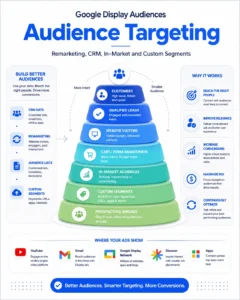
Search Targeting and Display Targeting Are Fundamentally Different
With a Google Search campaign, the keyword helps determine when an advert can enter an auction. The person has normally expressed some level of intent through their search.
Display targeting can be based on either the person or the content they are viewing.
| Targeting approach | What it attempts to identify | Example |
|---|---|---|
| Audience targeting | The type of person viewing the advert | Someone currently researching accountancy software |
| Content targeting | The environment in which the advert appears | An article about choosing accountancy software |
| First-party targeting | An existing relationship with the business | Someone who viewed the pricing page |
| Demographic targeting | Characteristics associated with the user | Age range, parental status or household income |
| Automated targeting | Additional people Google predicts may convert | Users outside the original selected audience |
| Placement targeting | A particular website, app, video or channel | An industry publication or relevant YouTube channel |
This distinction matters. Adding “commercial property insurance” as a Display keyword does not work like adding the same phrase to a Search campaign. A Display keyword generally helps Google understand relevant content or audience interests; it does not mean that everyone reached has just searched for that exact term.
Start with the Campaign Objective
Audience selection should follow the commercial objective—not the other way around.
Before creating a campaign, decide what you are trying to achieve.
Direct response and lead generation
A direct-response campaign is expected to generate measurable enquiries, bookings, trials, purchases or other valuable actions.
The strongest starting audiences will often include:
Previous website visitors
Cart or form abandoners
Existing leads that have not converted
Customer Match lists
High-intent custom segments
Relevant in-market segments
People who have visited high-value pages
Previous customers suitable for cross-selling
For lead generation, a completed form should not automatically be treated as a successful outcome. Connect advertising data to the CRM so you can distinguish between an unqualified enquiry, a qualified lead, an opportunity and a completed sale.
Brand awareness
Awareness campaigns are designed to build familiarity and mental availability before someone is ready to buy.
Relevant measures may include:
Reach
Frequency
Viewable impressions
Video completion
Brand-search growth
Direct traffic
Engaged visits
Search lift or brand lift
Assisted and post-view conversions
Awareness should not be used as an excuse for vague reporting. The measurement model may be broader, but the campaign should still have a defined audience, message, budget and evaluation period.
Consideration and demand generation
Consideration campaigns sit between awareness and immediate conversion. They can introduce a solution, explain a complicated service, promote educational content or move prospects towards a later search.
Demand Gen is particularly relevant here because it combines visual inventory with audience targeting across several Google channels. It is closer to paid social advertising than a conventional Search campaign, although Google’s first-party intent signals create different targeting opportunities.
Build Audiences Around Buying Intent
Not all audience signals indicate the same level of commercial intent. Someone who has a general interest in home improvement is not equivalent to someone comparing kitchen installation companies.
A useful audience hierarchy is:
Existing customers and sales opportunities
Qualified leads and previous converters
High-intent website visitors
Cart, checkout, quote or form abandoners
People actively researching the category
Custom segments built around commercial behaviour
Broader affinity and lifestyle audiences
Contextual and demographic prospecting
Fully automated expansion
This does not mean every campaign must start with remarketing. A new advertiser may not have enough first-party data. However, it demonstrates why broad targeting should not be compared directly with a small, high-intent remarketing audience.
Your Data Segments and Remarketing
Google now commonly refers to remarketing lists as “your data segments”. These can be created from website activity, app activity, YouTube engagement or customer information.
A basic remarketing campaign might target everyone who visited the website, but more precise segmentation usually produces better messaging and budget control.
Useful segments include:
All website visitors
Visitors to a particular service category
Product viewers
Pricing-page visitors
Quote-calculator users
Form starters who did not submit
Basket or checkout abandoners
Existing leads
Qualified opportunities
Previous customers
High-value customers
Customers approaching renewal
People who watched particular YouTube videos
Segment membership should reflect the buying cycle. A seven-day audience may be appropriate for an emergency service, while a commercial software purchase could require a much longer evaluation period.
Exclude people who should not see the advert
Remarketing is not only about inclusion. Exclusions can prevent budget waste and inappropriate messaging.
Depending on the objective, exclude:
Recent purchasers
Existing customers
Employees
Job applicants
Suppliers
Spam leads
People who completed the desired action
Users outside the service area
Very short or clearly irrelevant visits
A customer may still be valuable for cross-selling, referrals or renewal advertising, but they should be moved into a separate campaign with an appropriate message.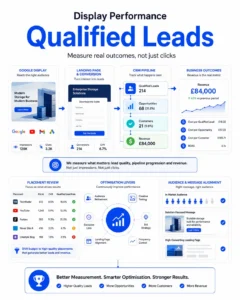
Customer Match and CRM Audiences
Customer Match allows advertisers to use consented customer information such as email addresses, telephone numbers and postal details to create first-party audience segments.
This is especially valuable when website-based audiences are incomplete or when the most useful commercial information exists in the CRM rather than Google Analytics.
CRM audiences can include:
New leads awaiting contact
Marketing-qualified leads
Sales-qualified leads
Open opportunities
Lost opportunities
Customers by product or service
High-lifetime-value customers
Dormant customers
Customers due to renew
Leads disqualified for a temporary reason
The most valuable list is rarely “all contacts”. A CRM containing customers, prospects, suppliers, applicants and spam submissions should not be uploaded as one undifferentiated audience.
Where appropriate, use Google Ads Data Manager, a native CRM connection or another secure integration to keep lists synchronised. Ensure that data collection, consent and activation comply with UK GDPR, Google’s Customer Match policies and the relevant consent requirements.
In-Market Audiences
In-market audiences are designed to reach people Google believes are actively researching or considering products and services within a category.
Google may infer this from signals such as:
Search and browsing activity
The type and frequency of content viewed
Product comparisons
Interactions with relevant websites
Recency of commercial behaviour
Engagement across Google properties
In-market audiences are generally more suitable for direct response than broad interest audiences, but they are not equivalent to Search keywords. The advertiser does not see every signal or know precisely why an individual entered the segment.
Treat them as useful indicators of intent, not guaranteed proof that someone is ready to purchase.
Affinity Audiences
Affinity audiences group people according to longer-term interests, habits and lifestyles. Examples might include technology enthusiasts, frequent travellers or fitness enthusiasts.
These audiences are normally broader than in-market segments and are often better suited to:
Brand awareness
Product launches
Sponsorship amplification
Educational content
High-reach video campaigns
Long buying cycles
Affinity targeting can produce substantial reach, but it may be inefficient when used by itself for an immediate lead-generation objective.
Life Events and Detailed Demographics
Life-event segments attempt to identify people experiencing significant milestones, such as:
Moving home
Getting married
Graduating
Starting a business
Retiring
These events can create temporary demand across several industries. Someone moving home may need a mortgage broker, solicitor, removal company, decorator, broadband provider and new furniture.
Detailed demographics can include characteristics such as:
Homeownership
Employment
Education
Marital status
Parental status
Availability varies by location, campaign type and advertising category. Some sensitive or regulated sectors also face restrictions on personalised advertising.
Custom Segments
Custom segments replaced much of the previous custom affinity and custom intent structure.
Advertisers can provide Google with combinations of:
Keywords and phrases
Relevant website URLs
Apps used by the intended audience
Interests or purchase intentions
Search terms used on eligible Google properties
For example, a commercial solar installer might create a custom segment using:
Commercial solar installation
Warehouse solar panels
Business solar grants
Competitor and industry publication URLs
Energy-management apps
Commercial renewable-energy terminology
The URLs do not instruct Google to place adverts on those exact websites. They help Google identify people who browse websites similar to them. If you want to advertise on a particular website, use managed placement targeting.
Search-term-based custom segments also need careful interpretation. On eligible Google-owned inventory, they may reach people who searched for those or similar terms. On other inventory, Google can interpret them as interests or purchase intentions.
Custom segments can be powerful, but the inputs should reflect the customer—not simply describe the advertiser.
Demographic Targeting
Standard demographic controls may include:
Age
Gender
Parental status
Household income
An “unknown” category
Demographics can be used to target, exclude or analyse groups, depending on campaign compatibility.
Avoid excluding demographic categories based only on assumptions. Google may not know every user’s demographic status, so aggressively excluding “unknown” users can remove valuable prospects.
A better process is to:
Begin with credible customer research
Use CRM and conversion data
Compare lead quality by segment
Analyse conversion value, not just conversion count
Make exclusions only when there is sufficient evidence
Consider whether the product naturally attracts buyers outside the expected profile
Age or gender may correlate with performance without causing it. The real difference could be income, device usage, geography, creative relevance or the campaign’s conversion tracking.
Contextual Keyword Targeting
Contextual keyword targeting helps Google find web pages, apps and videos related to selected themes.
For example, a business selling project-management software might use terms related to:
Project planning
Resource management
Team collaboration
Workflow software
Gantt charts
Business productivity
The advert could then appear beside relevant content even when Google has limited information about the individual user.
Contextual targeting can be useful when:
The subject matter strongly indicates likely interest
Personalised advertising is restricted
The campaign has a strong educational message
The advertiser wants to align with relevant content
Audience data is limited
However, context alone does not establish purchase intent. Someone reading an article about a topic may be a student, competitor, employee or casual researcher.
Topic Targeting
Topic targeting allows advertisers to select broader categories of content.
A financial software company might target topics relating to:
Business finance
Accounting and auditing
Enterprise software
Small business
Financial planning
Topics generally provide more reach but less precision than carefully selected placements or contextual keywords. They are often more suitable for controlled prospecting, awareness or testing than extremely narrow direct-response campaigns.
Managed Placements
Managed placements allow an advertiser to nominate particular:
Websites
Web pages
Mobile apps
YouTube channels
YouTube videos
Placement targeting is useful when you already know where your audience spends time.
For example, an advertiser could target specialist industry publications, trade-association websites or relevant YouTube channels. However, placement availability and advertising inventory are not guaranteed. A website appearing in Google’s placement planner does not mean every page or impression will always be available.
Regularly inspect the “where adverts showed” or placement report. A campaign may serve on pages or apps that meet Google’s targeting logic but have little commercial value for the advertiser.
Understand How Targeting Combinations Work
One of the most important Display targeting details is how Google combines targeting criteria.
Audience targeting and content targeting can narrow a campaign when used together. For example, you might reach an in-market audience only while those people are viewing selected content.
However, Google currently treats multiple content-targeting methods within the same ad group—placements, topics and Display keywords—as alternatives. The advert can appear when the content matches any of them, not necessarily all of them.
If an ad group contains:
A managed placement
A topic
Contextual keywords
Google can serve the advert on the placement, on pages matching the topic or on content matching the keywords. Adding more content methods can therefore broaden reach rather than create a tightly layered intersection.
If you require clean testing and control, separate targeting approaches into different ad groups or campaigns.
Targeting Versus Observation
“Targeting” limits reach to the selected criteria. “Observation” collects reporting data without restricting who can see the adverts.
Observation is particularly useful in Search campaigns, where advertisers can analyse audience performance while retaining keyword-based reach.
Display and Demand Gen campaign options differ, and automated targeting may move beyond manually selected signals. Never assume that adding an audience means only that audience will receive adverts. Review:
The selected targeting mode
Whether optimised targeting is enabled
Channel controls
Campaign and ad-group settings
Placement reports
Audience reporting
Actual conversion quality
Optimised Targeting
Optimised targeting is Google’s AI-led method for finding additional people predicted to complete the campaign’s conversion goals.
Your selected audiences, keywords and other criteria can act as starting signals. However, Google explains that optimised targeting may expand beyond those signals and may reduce delivery to them if the system predicts better performance elsewhere.
This is very different from the retired conservative and aggressive targeting controls.
Optimised targeting can be appropriate when:
Conversion tracking is accurate
The campaign has enough meaningful conversion data
The objective is customer acquisition
The budget can support exploration
Lead quality is imported from the CRM
The advertiser accepts wider audience discovery
It can be risky when:
Every form submission is counted equally
Spam leads are included as primary conversions
The campaign has very little data
Geography is incorrectly configured
Brand-safety requirements are strict
The advertiser needs to reach a precisely defined audience
Sales quality is not fed back into Google Ads
Google’s AI optimises towards the signals it receives. If the campaign records low-quality enquiries as successful conversions, the system can become increasingly efficient at generating more low-quality enquiries.
For lead-generation campaigns, offline conversion tracking should ideally distinguish between:
New enquiry
Contacted lead
Qualified lead
Sales opportunity
Completed customer
Revenue generated
Lookalike Segments
Google previously retired Similar Audiences from its standard campaign structure. Lookalike segments now provide a related acquisition method within Demand Gen.
A Lookalike segment begins with an eligible source audience, such as:
Previous purchasers
High-value customers
Website visitors
YouTube engagers
Qualified CRM leads
The quality of the source audience matters. A Lookalike based on every website visitor may be far less commercially useful than one based on confirmed customers or qualified opportunities.
Do not mix fundamentally different users into one source. Customers, job applicants, suppliers and unqualified leads may all appear in the CRM, but they should not train the same acquisition audience.
Audience Exclusions
Audience exclusions prevent adverts from reaching people who are unsuitable for a particular campaign.
Common exclusions include:
Existing customers from new-customer campaigns
Recent purchasers
Converted leads
Employees
Previous job applicants
Existing remarketing audiences from prospecting campaigns
Users below a required age
Irrelevant locations
Exclusions should reflect the campaign objective. A previous customer may be excluded from an acquisition campaign but included in a separate renewal or cross-sell campaign.
Placement and Content Exclusions
Display campaigns can appear across an enormous inventory of websites, videos and apps. Placement control is therefore a continuing optimisation task.
Use exclusions for:
Irrelevant websites
Poor-quality mobile apps
Unsuitable YouTube channels or videos
Content categories inconsistent with the brand
Placements producing accidental clicks
Placements consuming spend without valuable conversions
Websites associated with misinformation or inappropriate material
Google provides content suitability and placement exclusion controls, but automated classifications are not perfect. Advertisers with strict brand requirements should combine account-level safeguards with regular placement reviews.
Do not judge every placement solely by its name or click-through rate. Evaluate actual outcomes, conversion quality and whether the advert was likely to receive genuine attention.
Location Targeting Still Matters
Audience targeting does not replace location targeting.
A local service business should normally target people in or regularly present within its service area rather than everyone showing interest in the location. Otherwise, the campaign may reach travellers, researchers or people planning to visit the area.
Review:
Targeted towns, cities, regions or radiuses
Presence versus location-interest settings
Location exclusions
CRM addresses and serviceability
Performance by actual user location
Branch-specific landing pages and telephone numbers
A campaign can reach the correct type of person but still waste money if that person is outside the operational area.
Frequency Management
Display advertising can repeatedly reach the same person. Some repetition helps recognition, but excessive frequency creates waste and advert fatigue.
Monitor frequency alongside:
Audience size
Campaign duration
Creative variety
Click-through rate
View-through activity
Conversion lag
Reach
Cost per unique user
Post-impression behaviour
Small remarketing audiences are especially vulnerable to overexposure. Refresh creative and vary messages according to the audience’s stage.
A pricing-page visitor may need proof, reassurance or an offer. A customer should not repeatedly see the same introductory advert designed for someone unfamiliar with the brand.
Creative Is Part of the Targeting Strategy
Accurate targeting cannot rescue an irrelevant advert.
Display creative needs to communicate quickly because users are not normally searching for the advertiser when they see it. The advert should make the following clear:
Who the offer is for
What problem it solves
Why the business is credible
What makes the offer distinctive
What action the user should take
Responsive Display adverts combine images, logos, headlines, descriptions and other assets across different placements. Supply assets in multiple aspect ratios and review how they appear in previews.
Avoid relying on one generic message for every audience. Prospecting, remarketing, cart abandonment, customer retention and account-based campaigns should not all use identical copy.
Landing Pages Must Match the Audience
A broad awareness campaign may introduce a category or problem. A high-intent remarketing campaign should usually lead to a much more specific next step.
Match the page to the audience:
| Audience | Suitable landing-page emphasis |
|---|---|
| New prospect | Problem, solution and differentiation |
| In-market user | Product comparison, proof and benefits |
| Pricing-page visitor | Value, objections and commercial terms |
| Form abandoner | Simpler completion process and reassurance |
| Basket abandoner | Product reminder, delivery and returns |
| Qualified lead | Case studies, implementation and consultation |
| Existing customer | Upgrade, renewal or complementary service |
Sending every audience to the homepage weakens message continuity and makes campaign analysis more difficult.
Measure Display Advertising Carefully
Display conversions can include both click-through and view-through activity. A person may see an advert, avoid clicking it and later visit through Search or directly.
That does not mean every post-view conversion was caused by the advert.
Display measurement should consider:
Click-through conversions
Engaged-view conversions where relevant
View-through conversions
Assisted conversions
Conversion lag
New versus returning customers
Qualified lead rate
Sales opportunity rate
Revenue and profit
Brand-search changes
Incrementality testing
View-through conversions are useful evidence, but they can overstate performance when audiences already have a high probability of converting. This is particularly important with remarketing, where the campaign often reaches people who were already close to purchasing.
Where budgets justify it, use controlled experiments, geographic tests, audience holdouts or platform lift studies to estimate incremental impact.
A Practical Campaign Structure
A clear structure makes Display performance easier to understand.
Campaign: Remarketing
Separate ad groups or audiences for:
Product or service viewers
Pricing-page visitors
Form or basket abandoners
Previous leads
Existing customers
Use exclusions so users do not sit unnecessarily in conflicting stages.
Campaign: High-intent prospecting
Test separately:
In-market audiences
Commercial custom segments
Lookalike segments
Selected managed placements
Contextual commercial content
Optimised targeting can be tested deliberately rather than allowed to blur every audience experiment.
Campaign: Broader demand generation
Use:
Affinity audiences
Life events
Broader custom segments
Topics
YouTube and Discover
Educational or problem-led creative
Evaluate reach, engagement, search demand and later-stage performance—not only immediate form submissions.
Common Display Targeting Mistakes
Treating Display keywords like Search keywords
Display keywords describe content or audience interests. They do not reproduce the intent of a live Google search.
Combining targeting methods without understanding the logic
Multiple content methods can broaden an ad group because placements, topics and keywords may operate as “OR” conditions.
Allowing optimised targeting to obscure the test
If Google expands beyond selected audiences, the results may not represent the original segment. Separate controlled and expanded targeting where possible.
Optimising towards weak conversions
If every unqualified lead is a primary conversion, automated bidding will favour quantity rather than commercial value.
Ignoring mobile-app placements
Some apps can generate high click volumes with poor engagement or accidental interactions. Review placement performance rather than excluding all apps without evidence.
Using one advert for every funnel stage
Cold prospects, pricing-page visitors and previous customers need different reasons to act.
Trusting platform attribution without validation
Google Ads reporting is valuable, but compare it with CRM outcomes, sales data and incremental testing.
Chasing a cheap CPA
A £20 lead that never answers the telephone is not necessarily better than a £60 lead that becomes a £5,000 customer.
Display Audience Targeting Checklist
Before launching, confirm that:
The campaign has one clearly defined commercial objective
Primary conversions represent genuine business value
CRM outcomes can be imported where appropriate
Remarketing and Customer Match data are collected lawfully
New customers and existing customers are separated
Geographic settings match the service area
Audience and content targeting are structured deliberately
Optimised targeting is either intentionally enabled or disabled
Placement and content exclusions are configured
Frequency and creative fatigue will be monitored
Ads are available in suitable formats and aspect ratios
Landing pages match the audience’s buying stage
View-through conversions will not be treated as unquestionable proof
Performance will be judged by qualified leads, sales and revenue
Final Thoughts
Google Display advertising is no longer simply a collection of banner placements. It is becoming part of a broader Demand Gen system combining first-party data, audience signals, content, creative assets, automated bidding and Google’s predictive models.
The strongest strategy is not to select every available audience and let the campaign run. It is to build a deliberate testing framework:
Start with the commercial objective
Separate warm audiences from cold prospecting
Use CRM data to define valuable users
Understand when targeting criteria narrow or broaden reach
Control automated expansion according to data quality
Match creative and landing pages to buying intent
Measure qualified outcomes rather than raw conversion volume
Display advertising may not always record the same immediate cost per conversion as Search. It can still create substantial value by generating awareness, supporting longer decisions, re-engaging prospects and increasing future branded demand.
The deciding factor is whether that additional reach influences the right people—and whether your measurement system can demonstrate the difference.