
Performance Max can be one of the most effective campaign types in Google Ads—or an expensive way to give an automated system the wrong instructions at scale.
The difference is rarely the final button pressed in the campaign builder. It is determined by the preparation: what counts as a conversion, which customers are valuable, what Google is allowed to advertise, which landing pages can be selected, how brand traffic is treated and whether the campaign receives enough reliable data to learn.
Google describes Performance Max as a goal-based campaign that can access Search, Shopping, YouTube, Display, Discover, Gmail and Maps from one campaign. That description is correct. However, access to more inventory is not automatically the same as access to more profitable demand.
This independent guide explains how to set up a Performance Max campaign properly, including the choices inside Google Ads and the commercial decisions that should be made before launch. It covers ecommerce, lead generation, campaign structure, conversion goals, bidding, budgets, asset groups, product feeds, search themes, audience signals, brand controls, Final URL Expansion and post-launch checks.
If you first need a broader explanation of the campaign type, read the One PPC guide to Performance Max. For service businesses, the dedicated guide to Performance Max for lead generation examines lead quality and CRM feedback in greater depth.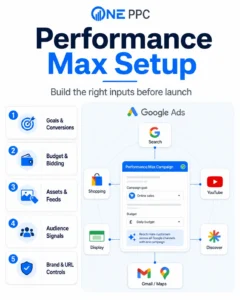
Performance Max Is an Optimisation System, Not a Business Strategy
Performance Max uses Google’s automation to decide where an advert should appear, which creative combination to use and how much to bid in an individual auction. The advertiser supplies the commercial direction through:
Conversion actions and values.
Budget and bid targets.
Locations and languages.
Product or page feeds.
Landing pages.
Creative assets.
Audience signals and first-party data.
Search themes.
Brand exclusions and negative keywords.
Customer-acquisition settings.
The system then tries to achieve the configured objective. It does not independently know whether a form submission was genuine, a lead was qualified, an order was profitable or a sale would have happened without advertising.
This is why Google’s setup recommendations should be treated as platform guidance, not independent commercial advice. Google has excellent technical documentation and unique auction data, but it is also the media owner selling the advertising. Recommendations that increase reach, remove a target or raise a budget may help the campaign find more conversions, but they should still be assessed against profit, qualified pipeline and incremental revenue.
The independent advertiser’s question is not simply, “Will this help Performance Max spend and convert?” It is, “Will this help the business acquire additional profitable customers?”
When Should You Use Performance Max?
Performance Max is most credible when the account already has trustworthy conversion tracking and a clear commercial objective. It is often strongest in the following situations:
An ecommerce business has an accurate Merchant Center feed and reliable purchase values.
A lead-generation business can send qualified lead, opportunity or customer outcomes back from its CRM.
Existing Search or Shopping campaigns have already established what converts.
The advertiser has enough budget and conversion volume for automated bidding to learn.
There is a credible set of image, text and video assets.
The business wants controlled expansion across Google’s wider inventory.
It is less suitable as a first response to weak Search performance, broken tracking, poor lead quality, an uncompetitive offer or an ineffective landing page. Automation amplifies the quality of its inputs. It can also amplify their weaknesses.
For modest-budget service businesses, we normally establish high-intent Search using Exact and Phrase Match before testing wider automation. Broad Match, AI Max and Performance Max can then be introduced as governed expansion tools rather than account defaults. The wider Google Ads setup and optimisation guide explains this staged approach.
Before Opening the Campaign Builder
Complete the following work before selecting “New campaign”. It is much easier to launch a clean campaign than to repair a live campaign after poor data has entered the bidding model.
Define the sale, lead or other outcome the campaign should create.
Calculate the acceptable cost per acquisition or minimum return on ad spend.
Verify the conversion tracking from advert click to completed action.
Decide which conversion actions will be Primary and which will be Secondary.
Confirm the geographic service area and location presence settings.
Decide whether brand searches should be included or excluded.
Prepare the product feed or landing-page structure.
Prepare text, image, logo and video assets.
Assemble customer lists and useful audience signals.
Create an initial list of irrelevant searches, services and locations to exclude.
Decide how Performance Max will coexist with Search, Shopping and Demand Gen.
Record a pre-launch baseline so incremental performance can be assessed.
The Google Ads account structure guide can help determine whether a new campaign is justified or whether the proposed segmentation would simply divide the data unnecessarily.
Step 1: Define the Commercial Objective
Start with the business result, not the campaign type.
For ecommerce, the primary objective is usually purchase revenue. Depending on the business, gross profit, new-customer value or lifetime value may be more useful than top-line sales.
For lead generation, a basic website conversion could be a submitted enquiry form or meaningful telephone call. However, the most useful optimisation outcome may be a Qualified Lead, booked appointment, Sales Opportunity, completed customer or revenue event recorded later in the CRM.
Write down:
The outcome being acquired.
Its average or expected value.
The acceptable acquisition cost.
The minimum acceptable ROAS, where applicable.
The expected delay between click, lead and sale.
The monthly volume of genuine outcomes available for learning.
A campaign cannot optimise towards a definition the business has never made.
Step 2: Audit Conversion Tracking
Performance Max uses conversion-based Smart Bidding. Conversion tracking is therefore part of the targeting system, not merely a reporting feature.
Open Goals in Google Ads and review every conversion action that could be included in the campaign. Check:
Whether the tag is active and recording reliably.
Whether the count setting is appropriate.
Whether values and currencies are accurate.
Whether transaction IDs prevent duplicate ecommerce purchases.
Whether phone-call duration reflects a meaningful enquiry.
Whether page views, button clicks and other micro-conversions are incorrectly Primary.
Whether imported GA4 events duplicate native Google Ads conversions.
Whether the attribution and conversion window suit the buying cycle.
Whether consent and first-party data collection are implemented correctly.
Our Google Ads conversion tracking guide explains online measurement in more detail.
Do not optimise Performance Max towards every available action. A page view, chat opening, form start and completed lead should not all tell Smart Bidding that the same person produced four independent successes.
Use Primary actions for outcomes that should influence bidding. Keep diagnostic or supporting actions as Secondary unless they have a deliberate role in a campaign-specific goal.
Step 3: Improve Lead-Generation Measurement
For an ecommerce campaign, the purchase usually provides an immediate revenue signal. Lead generation is harder because Google can see the enquiry before it knows whether the enquiry was valuable.
If every form submission is treated equally, Performance Max can learn to find the people most likely to submit a form—not necessarily those most likely to buy. This can produce cheap spam, job applications, support requests, students, suppliers or unsuitable prospects.
A stronger lead-generation sequence is:
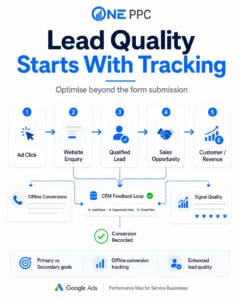
Website enquiry → Qualified Lead → Sales Opportunity → Customer → Revenue
Use website tracking for the initial form or call, then return selected later outcomes through Enhanced Conversions for Leads and offline conversion imports. The offline conversion tracking guide and Enhanced Conversions for Leads setup guide explain this measurement architecture.
Where enough volume exists, optimise towards one meaningful stage rather than several cumulative stages. Counting the same person as a lead, Qualified Lead, opportunity and customer can distort the learning signal unless the actions and values have been designed carefully.
There is no universal conversion threshold that guarantees good performance. As a practical One PPC benchmark, we prefer around 30–50 meaningful monthly conversions before relying heavily on automated expansion. Google systems can operate with less, but lower volume normally produces slower and less stable learning. Value-based Target ROAS strategies are generally more credible when the account has a larger and consistent history—often at least 50–100 relevant conversions—although value accuracy matters more than reaching an arbitrary number.
Step 4: Decide How Performance Max Fits the Existing Account
Performance Max should normally complement existing campaigns rather than replace everything automatically.
Keep dedicated Search campaigns when you need:
Direct keyword and search-intent control.
Specific adverts and landing pages for high-value searches.
Separate budgets for priority services.
Clear brand and non-brand reporting.
Impression Share and detailed Search management.
A controlled Exact and Phrase Match foundation.
Keep Standard Shopping when query visibility, product-level control or a hybrid Shopping structure is strategically important. Use Demand Gen when the main objective is audience-led visual demand creation rather than an automated conversion campaign spanning nearly all Google inventory. See the Demand Gen campaign guide for the distinction.
Performance Max does not automatically take preference over every Standard Search campaign. Google’s current prioritisation rules state that an identical, eligible Exact Match Search keyword is prioritised over Performance Max. Identical Phrase or Broad Match keywords and Performance Max search themes can share a priority level; relevance and Ad Rank can then decide which eligible ad or asset group is used. Budget limitations, targeting differences, disapprovals and low-search-volume status can also make the expected Search keyword ineligible. Google documents the current prioritisation rules here.
This means Search and Performance Max can run together, but the boundary must still be monitored. Do not assume campaign names create separation that the auction system respects.
Step 5: Choose the Right Campaign Structure
Do not create a separate Performance Max campaign for every product, audience or creative idea. Excessive segmentation divides conversion data and makes learning harder.
Create separate campaigns when a genuine control needs to differ, such as:
Budget.
Target CPA or Target ROAS.
Conversion goals.
Country or language.
Product margin or commercial priority.
New-customer strategy.
Seasonal timing.
Brand treatment.
Inventory or feed coverage.
Operational reporting.
Use asset groups within a campaign for coherent themes that can share the same budget, bidding strategy and goals. Examples include individual services, product categories, customer types or creative concepts.
An asset group is not the same as a Search ad group. It is a collection of related creative, audience signals, search themes and—where relevant—listing groups that Google can combine across formats.
Step 6: Create the Campaign and Select an Objective
In Google Ads:
Open Campaigns.
Select the Create button.
Select Campaign.
Choose the most relevant objective, such as Sales or Leads. You can also use Create a campaign without a goal’s guidance when you want to avoid unnecessary wizard recommendations.
Review the conversion goals presented by Google.
Select Performance Max as the campaign type.
Link or select the Merchant Center account if this is an ecommerce campaign using product data.
Give the campaign a descriptive name.
Google’s current interface presents Performance Max for sales, leads, website traffic, local store objectives and some specialist use cases. The exact screens can vary by objective and account features, but Google’s official process follows six broad stages: goal, bidding, campaign settings, asset group, budget, then review and publication. Google’s campaign creation instructions are available here.
Use a name that communicates the variables that matter. For example:
PMax | UK | Non-Brand | Core Services | Qualified Leads
or:
PMax | UK | High-Margin Products | New Customers | tROAS
Avoid names such as “PMax 1” that become meaningless once the account expands.
Step 7: Select Campaign-Specific Conversion Goals
Do not accept the account-default goals without reviewing them.
Choose the conversion actions that represent success for this specific campaign. A lead-generation campaign might use Qualified Lead as its primary bidding action while retaining the initial form submission as Secondary for reporting. An ecommerce campaign will usually use Purchase with accurate transaction value.
Check that unrelated actions are excluded. A campaign selling a high-value consultancy service should not optimise towards newsletter sign-ups simply because they are an account-default goal.
The Primary and Secondary conversions guide explains how these settings affect reporting and Smart Bidding.
Step 8: Connect and Check Merchant Center for Ecommerce
For retail, connect the correct Merchant Center account and select the country and product feed. Before launch, verify:
Product titles and descriptions accurately describe search intent.
GTINs, brands and other identifiers are complete.
Prices and availability match the website.
Shipping and return information is configured.
Product images are clear and compliant.
Product types and Google product categories are useful.
Custom labels identify margin, seasonality, price band, stock position or commercial priority.
Disapprovals and warnings have been resolved.
Conversion values, currency and transaction IDs work correctly.
The product feed is one of the campaign’s most important targeting and creative inputs. A poor feed cannot be rescued reliably by a higher budget.
Google permits a feed-only Performance Max campaign to launch without manually supplied creative assets. However, it may generate assets automatically, and adding manual creative later introduces minimum asset requirements that prevent the campaign returning to its original feed-only state. Decide whether a feed-only test is intentional before adding assets. Google explains this limitation in its Performance Max overview.
Step 9: Choose the Bidding Strategy
Performance Max uses conversion-based Smart Bidding. The practical choices are centred on conversions or conversion value.
| Business situation | Initial bidding direction | Main risk |
|---|---|---|
| Lead generation with similar lead values | Maximise Conversions, potentially followed by Target CPA | Cheap but poor-quality enquiries |
| Lead generation with reliable differentiated values | Maximise Conversion Value or Target ROAS | Artificial values or sparse CRM feedback |
| Ecommerce with accurate revenue | Maximise Conversion Value, potentially followed by Target ROAS | Revenue optimisation without margin awareness |
| Mature campaign with stable acquisition economics | Target CPA or Target ROAS | An unrealistic target restricting delivery |
Maximise Conversions attempts to use the budget to generate as many included conversions as possible. Maximise Conversion Value seeks the highest total value. A target CPA or ROAS introduces an efficiency constraint.
Do not enter an aspirational target that the account has never achieved. A restrictive target can suppress traffic and prevent useful learning. Conversely, leaving the strategy unconstrained can spend the available budget aggressively. Select the starting approach using historical data, commercial tolerance and signal quality—not the option that produces the highest forecast in the setup wizard.
Google’s labels for Target CPA and Target ROAS are being separated from Maximise Conversions and Maximise Conversion Value in parts of the interface, but the underlying choice remains between an unconstrained maximise strategy and a strategy pursuing an average efficiency target. The One PPC bidding strategies guide explains the implications.
For lead generation, do not solve a quality problem by lowering the Target CPA. If the conversion action rewards poor leads, a tighter target may simply encourage the system to find more of the same low-quality outcome.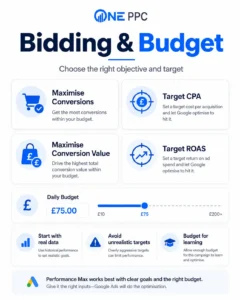
Step 10: Set a Deliberate Daily Budget
Google may display low, medium and high budget suggestions. These are forecasts intended to help the campaign gain delivery. They do not know the company’s cash flow, gross margin, sales capacity or tolerance for experimentation.
Set a budget that is large enough to collect useful data but small enough that an unsuccessful learning period remains commercially acceptable.
Consider:
The expected CPA or order value.
The conversion rate and length of the buying cycle.
Existing Search or Shopping budgets that must be protected.
The likely time needed to observe qualified leads or completed sales.
Whether the business can handle additional leads or orders.
How much exploration across non-Search inventory is acceptable.
Avoid dividing a modest budget between many Performance Max campaigns. One well-structured campaign often learns more effectively than several underfunded campaigns.
Also remember that an average daily budget is not a hard daily cap. Google can spend more on individual days and balance delivery over its billing rules. Budget governance should therefore be based on monthly exposure as well as the number shown in the daily field.
Step 11: Configure Locations and Languages
Select only the locations the business can serve profitably. For most local and regional lead-generation campaigns, use the advanced location option based on Presence—people in or regularly in the included locations—rather than people who merely show interest in them.
Check:
Included countries, regions, cities or radius targets.
Excluded locations.
Presence versus presence-or-interest behaviour.
Whether each landing page genuinely supports the targeted area.
Whether the sales or delivery operation can serve every included location.
Whether local telephone numbers, addresses and opening hours are accurate.
Location errors become more expensive in a campaign with access to multiple channels. Do not rely on ad copy mentioning the target location to prevent traffic from elsewhere.
Language targeting identifies users Google believes understand the selected languages. It is not a translation service. Provide appropriate adverts and landing pages for every language you intentionally target. Separate campaigns are normally preferable when languages require different creative, sales handling or budgets.
Step 12: Review Final URL Expansion and Text Customisation
Final URL Expansion allows Google to replace the asset group’s Final URL with another page on the same domain when it predicts that page is more relevant. Text Customisation—previously called Automatically Created Assets—allows Google to generate additional text from landing pages, the domain and existing adverts.
Google turns Text Customisation on by default and generally recommends wider automation because it increases the campaign’s ability to serve. That can be useful for a well-organised ecommerce or content-rich website. It can also send traffic to unsuitable pages or produce messaging that the advertiser did not intend.
Turn Final URL Expansion off, or use URL exclusions, when the website contains:
Recruitment and careers pages.
Support, login or customer-service sections.
Blog content with weak commercial intent.
Old services or out-of-area pages.
Terms, policy and administrative pages.
Products or services outside the campaign objective.
Landing pages that are not compliant for advertising.
Pages with different pricing, claims or commercial conditions.
For a tightly controlled lead-generation campaign, we often begin with Final URL Expansion disabled or constrained. Expansion can be tested after the advertiser has proved which pages and enquiries create value.
For a large retailer with a clean site and accurate feed, expansion may be useful, but URL performance and generated assets still need review. Google confirms that Final URL Expansion can change the landing page and dynamically generate matching creative in its campaign settings guidance.
Step 13: Configure Brand Controls and Negative Keywords
Decide whether Performance Max should acquire new non-brand demand, harvest existing brand demand or do both.
Brand traffic often converts efficiently because the user already knows the company. If it is mixed into Performance Max, the campaign can report an impressive average CPA or ROAS without proving that it generated much additional demand.
Use a brand exclusion when you want to prevent Performance Max from serving for selected brands. Use campaign-level negative keywords to block specific irrelevant queries from Search and Shopping inventory. Account-level negative keywords can provide broader protection where appropriate.
Common starting exclusions for lead generation include:
Jobs, careers, salaries and training.
Free, DIY, templates and definitions where unsuitable.
Unsupported services or products.
Locations outside the service area.
Existing-customer support terms.
Irrelevant meanings of an ambiguous service.
Do not paste a generic negative list into the account without review. A term that is irrelevant for one business may be commercially valuable for another. The negative keyword guide and Search Terms report guide explain how to build exclusions around actual intent.
A brand campaign can be operated separately when the business wants direct control over brand messaging, competitor defence and budget. If branded traffic is temporarily retained inside Performance Max to help a genuinely new campaign collect conversions, document the decision and later test a clearer brand/non-brand structure. Do not present blended performance as pure acquisition.
Step 14: Build Coherent Asset Groups
Create the first asset group around one commercial theme. Every component should make sense together:
The service or product set.
The customer problem or intent.
The Final URL.
Headlines and descriptions.
Images and video.
Audience signal.
Search themes.
Product listing group, if used.
For a home-improvement company, “roof replacement” and “garden maintenance” should not share an asset group simply because the same business provides both. The landing pages, imagery, search intent and sales economics are different.
For ecommerce, listing groups determine which products belong to the asset group. Segment products using categories, product types, brands, item IDs or custom labels where that creates a meaningful commercial or creative distinction.
Do not create several asset groups containing substantially identical assets and the same products. That creates the appearance of structure without giving the system meaningfully different inputs.
Google itself recommends organising asset groups by a coherent category, theme, language or audience. Its asset-group guidance is useful for understanding the mechanics.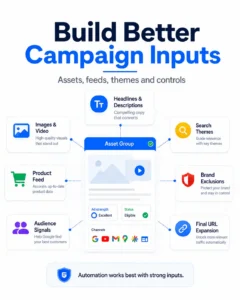
Step 15: Supply Strong Creative Assets
Performance Max assembles adverts for different Google surfaces. Supply a complete, coherent set rather than relying on generated material to fill every gap.
Prepare:
Short headlines.
Long headlines.
Descriptions with distinct messages.
Square, landscape and portrait images.
Square and landscape logos.
At least one useful video in suitable aspect ratios.
The verified business name.
Calls to action.
Sitelinks and other relevant account or campaign assets.
Creative should communicate the offer, audience, proof and next action. Avoid filling every field with minor variations of the same sentence.
For services, include real work, people, locations, results or the delivery process where possible. For ecommerce, use high-quality product and lifestyle imagery that remains consistent with the feed and landing page.
Upload a deliberate video rather than allowing an automated video to define the brand by default. Auto-generated videos can be functional, but they may combine static assets, products and copy in ways that are technically eligible yet commercially weak.
Ad Strength is a diagnostic about asset completeness and variety. It is not a guarantee of profitable performance. A campaign should not replace a proven message merely to satisfy a platform score.
Step 16: Add Audience Signals
Audience signals give Performance Max useful starting information. They do not restrict delivery to those people.
Prioritise first-party and commercially relevant signals:
Previous customers.
Qualified leads.
High-value customers.
Website visitors.
Cart abandoners.
CRM segments.
Relevant Customer Match lists.
Custom segments based on commercial search behaviour, websites or apps.
Relevant in-market or demographic segments where useful.
Separate lists by value where possible. A list of profitable customers is more informative than a combined list containing customers, spam enquiries, applicants and newsletter subscribers.
Audience signals help the system begin learning, but Performance Max can move beyond them. They should not be described internally or to a client as conventional audience targeting.
Step 17: Add Search Themes
Search themes allow the advertiser to give Google additional information about the searches customers may use. Google currently permits up to 50 search themes per asset group, but reaching the limit is not the objective.
Add focused themes that represent:
Core products or services.
High-value problems and use cases.
Commercial category language.
Important terms not obvious from the landing page.
New offers with little historical data.
Specialist terminology known by the market.
Do not copy an enormous keyword list into search themes. They are signals, not Exact Match restrictions. Google states that search themes behave at the same prioritisation level as Phrase and Broad Match when an identical query is considered, with later relevance and Ad Rank rules determining selection.
Use the keyword research guide to distinguish genuine commercial intent from informational volume.
Step 18: Configure Customer Acquisition Where Relevant
Retailers and subscription businesses may want to bid differently for new customers. Performance Max supports customer-acquisition goals, but the setting is only useful when the account can identify existing and new customers accurately.
Before enabling it:
Upload or connect suitable existing-customer data.
Implement the relevant new-customer parameter where possible.
Decide whether the campaign should bid higher for new customers or focus exclusively on them.
Calculate a defensible additional value for a new customer.
Check whether repeat purchasing and lifetime value justify the premium.
Do not add an arbitrary new-customer value merely to make reported ROAS look stronger. The additional value should represent real expected economics.
Step 19: Add Advert Assets and Brand Guidelines
Review the campaign’s business name, logos and brand guidelines. These settings influence how the brand appears across automatically assembled adverts.
Add relevant assets such as:
Sitelinks.
Call assets.
Callouts.
Structured snippets.
Price or promotion assets where appropriate.
Lead form assets only when the lead route and CRM follow-up are ready.
If a Google-hosted lead form is used, test the integration before launch. A lead collected inside Google is only useful when it reaches the CRM quickly, retains source information, triggers the correct follow-up and can later return quality outcomes.
Step 20: Review, Publish and Record the Baseline
Before selecting Publish, conduct a manual review. Do not treat the absence of a Google warning as proof that the campaign is commercially correct.
Check:
Campaign name.
Conversion goals and Primary actions.
Bidding strategy and target.
Daily budget and monthly exposure.
Locations, exclusions and presence settings.
Languages.
Start and end dates.
Merchant Center and product selection.
Final URL Expansion.
Text Customisation and generated assets.
Brand exclusions.
Negative keywords.
Asset-group themes.
Listing groups.
Landing pages.
Search themes.
Audience signals.
Business name, logos and advert assets.
Tracking templates, auto-tagging and CRM capture.
Save screenshots or an implementation record showing the original settings. Record the launch date, budget, target, conversion goal and expected evaluation window. This makes later diagnosis far more reliable.
What to Do Immediately After Launch
Test the full user journey as soon as the campaign is eligible:
Open the relevant landing pages on mobile and desktop.
Complete a test form, call or purchase.
Confirm that Google Ads receives the online conversion.
Confirm that GCLID, GBRAID or WBRAID and UTMs are retained where applicable.
Confirm that the contact or order enters the correct CRM or ecommerce system.
Test any offline conversion or qualified-stage import.
Review advert previews and generated assets.
Check product eligibility and policy status.
Confirm location traffic is consistent with the service area.
Verify that old, administrative or irrelevant URLs are not being selected.
Do not make several major changes every day because early performance fluctuates. Google states that significant changes can require a learning period. However, “let it learn” is not a reason to ignore broken tracking, policy problems, irrelevant queries or obviously unsuitable leads. Correct material implementation faults immediately; allow genuine bidding variation enough time to develop.
How to Monitor the Campaign
Performance Max reporting has improved considerably. Use the available reports rather than relying only on the campaign total.
Review:
Conversion actions and value.
Qualified leads, customers and revenue outside Google Ads.
Search Terms reporting.
Search-category insights.
Channel Performance reporting.
Asset-group performance.
Asset-level impressions, clicks, cost and conversions where available.
Product and listing-group performance.
Landing-page performance.
Placement reporting and brand-safety controls.
New versus returning customer performance.
Budget, target and bid-strategy status.
Google’s Channel Performance report shows how delivery and reported results are distributed across channels and formats. The newer Performance Max Search Terms report provides more granular query visibility than the earlier category-only reporting.
These reports increase transparency, but attribution still needs interpretation. A channel receiving conversion credit is not automatically the channel that created incremental demand. Compare Google Ads reporting with CRM, ecommerce, analytics, brand-search and total-business performance.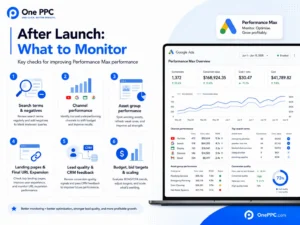
A Practical Optimisation Schedule
During the first few days, prioritise eligibility, tracking, URLs, spend anomalies and lead validity. Do not judge a complex automated campaign from one day of results.
During the first few weeks:
Review search terms and add carefully selected negatives.
Check whether brand traffic is inflating reported performance.
Assess lead quality in the CRM.
Review channel distribution and placement concerns.
Confirm products and landing pages receiving spend.
Fix weak or misleading creative assets.
Watch for budget limitations or an unrealistic target.
Compare reported revenue with actual order data.
Once enough evidence exists:
Replace weak assets with genuinely different creative concepts.
Adjust product segmentation around margin or business priority.
Test qualified-lead or revenue-based goals.
Introduce or refine Target CPA or Target ROAS.
Test brand exclusions.
Compare Final URL Expansion on versus a controlled URL set.
Reallocate budget between Search, Shopping, Demand Gen and Performance Max.
Scale in measured increments when marginal performance remains acceptable.
Follow the Google Ads optimisation checklist for a broader recurring management routine.
Common Performance Max Setup Mistakes
The most frequent errors are not exotic technical problems. They are basic commercial decisions hidden by a polished automated interface.
Selecting every conversion action: This rewards calls, page views, forms and micro-actions as though they were equally valuable.
Launching before tracking is tested: Smart Bidding cannot compensate for missing or duplicate conversion data.
Using Maximise Conversions with poor lead feedback: The system finds the easiest recorded leads, which may be the least valuable.
Accepting all locations and presence settings: The campaign can spend outside the genuine service area.
Leaving Final URL Expansion unrestricted: Google may select pages that were never intended as advertising destinations.
Mixing unrelated services in one asset group: This weakens the relationship between intent, creative and landing page.
Using audience signals as though they are targeting: Performance Max can and will expand beyond them.
Ignoring brand traffic: Strong blended ROAS may be driven by people already searching for the business.
Starting with an unrealistic CPA or ROAS target: The campaign may struggle to enter enough auctions to learn.
Creating too many campaigns: Conversion data and budget are divided without gaining useful control.
Using incomplete or weak creative: Google fills gaps, but eligibility is not the same as persuasive advertising.
Judging only Google-reported conversions: Profit, refunds, lead quality, sales capacity and incrementality remain business-side questions.
The Google Ads mistakes guide covers further account-wide risks.
Performance Max Setup Checklist
Use this final checklist before launch.
Commercial setup
A clear acquisition outcome has been defined.
Acceptable CPA, customer-acquisition cost or ROAS is documented.
Margin and lifetime value are understood where relevant.
Performance Max has a defined role beside existing campaigns.
Measurement
Online conversion tracking has been tested.
Values, currency and transaction IDs are accurate.
Primary and Secondary actions are intentional.
Duplicate GA4 and Google Ads conversions have been removed.
Lead quality or revenue can be returned from the CRM where possible.
Auto-tagging and advertising identifiers are retained.
Campaign settings
The correct objective and campaign type are selected.
Campaign-specific conversion goals are used.
Bidding and targets reflect real historical economics.
Budget exposure is commercially acceptable.
Locations and presence settings are correct.
Languages match the creative and landing pages.
Final URL Expansion and Text Customisation are deliberate choices.
Brand exclusions and negative keywords are configured.
Structure and creative
Each asset group has one coherent theme.
Listing groups include only intended products.
Merchant Center data is accurate and approved.
Text, image, logo and video assets are complete.
Search themes are focused and commercially relevant.
Audience signals prioritise first-party, high-quality data.
Advert assets and brand guidelines are correct.
Launch and governance
The full conversion journey has been tested.
Generated assets and landing pages will be reviewed.
Search Terms and Channel Performance reports are scheduled for review.
CRM or ecommerce results will be reconciled with Google Ads.
The launch baseline and settings have been recorded.
Success will be judged by qualified leads, customers, revenue and profit.
Frequently Asked Questions
Should a New Google Ads Account Start With Performance Max?
It can, particularly for ecommerce with a strong product feed and reliable purchase tracking. However, many new lead-generation accounts benefit from establishing controlled, high-intent Search first. Search can reveal which queries, adverts and landing pages produce genuine enquiries before Performance Max expands across wider inventory.
Should I Use Maximise Conversions or Target CPA?
Use Maximise Conversions when the campaign needs freedom to find conversion volume within the budget and the business can tolerate variation. Use Target CPA when there is enough reliable evidence to set a realistic efficiency target. Neither strategy fixes poor conversion definitions or weak lead quality.
Should Ecommerce Use Target ROAS From Launch?
Only when the account has reliable conversion values and a defensible target. A new or low-volume campaign may need Maximise Conversion Value without an aggressive target while it gathers evidence. Mature accounts can use historical performance and margin requirements to set Target ROAS more credibly.
Should Final URL Expansion Be On or Off?
It depends on the quality and scope of the website. It can help a well-structured retailer or multi-page site match users with relevant pages. For tightly controlled service campaigns, regulated offers or websites containing many unsuitable pages, begin with it off or use strong URL exclusions.
Do Audience Signals Restrict Who Sees the Adverts?
No. They guide early learning but do not act as strict audience targeting. The campaign can serve beyond the supplied segments.
Do Search Themes Work Like Keywords?
Not in the traditional targeting sense. They give Performance Max additional information about relevant searches. They do participate in Google’s Search prioritisation logic, but they do not provide the same control as an Exact Match keyword in a dedicated Search campaign.
Will Performance Max Replace My Search Campaign?
It should not be assumed to replace Search. An identical eligible Exact Match Search keyword receives priority under Google’s current rules. Other overlapping eligibility can be resolved using relevance and Ad Rank. Search remains valuable where query control, messaging, budgeting and reporting matter.
Can Performance Max Generate Poor-Quality Leads?
Yes. This most often happens when the campaign is rewarded for any form submission, locations are too broad, spam controls are weak or the landing page attracts low-intent users. CRM feedback, offline conversions, negative keywords, location presence, controlled URLs and better qualification help address the cause. See the guide to improving Google Ads lead quality.
How Long Should I Leave Performance Max to Learn?
There is no fixed period that applies to every business. Conversion volume, buying-cycle length, budget and the scale of a change all matter. Avoid constant changes, but fix broken tracking and obviously incorrect settings immediately. Evaluate the campaign over a period long enough to observe the actual business outcome—not merely the initial website conversion.
Is a High Ad Strength Score Proof of a Good Campaign?
No. Ad Strength can highlight missing or insufficiently varied assets. It does not prove that the offer, tracking, customer quality or commercial return is strong.
Conclusion
Setting up a Performance Max campaign is not simply a matter of completing Google’s wizard. The most important work happens before and around the interface: defining a valuable conversion, protecting the budget, controlling brand and location exposure, supplying strong data and creative, and deciding how the campaign fits with Search, Shopping and Demand Gen.
Google’s automation is powerful, but it is literal. It will optimise towards the goals and values supplied to it. If the account rewards cheap forms, it can pursue cheap forms. If it receives accurate purchases, Qualified Leads, customers and revenue, it has a much stronger basis for profitable decisions.
Treat Performance Max as controlled expansion. Start with sound measurement, add the broad reach deliberately, inspect what the system does and judge success independently through qualified pipeline, customers, revenue, profit and incrementality.
If you need help planning, building or auditing a campaign, One PPC provides Google Ads management, conversion tracking, CRM integration and independent account reviews for ecommerce and lead-generation advertisers.