
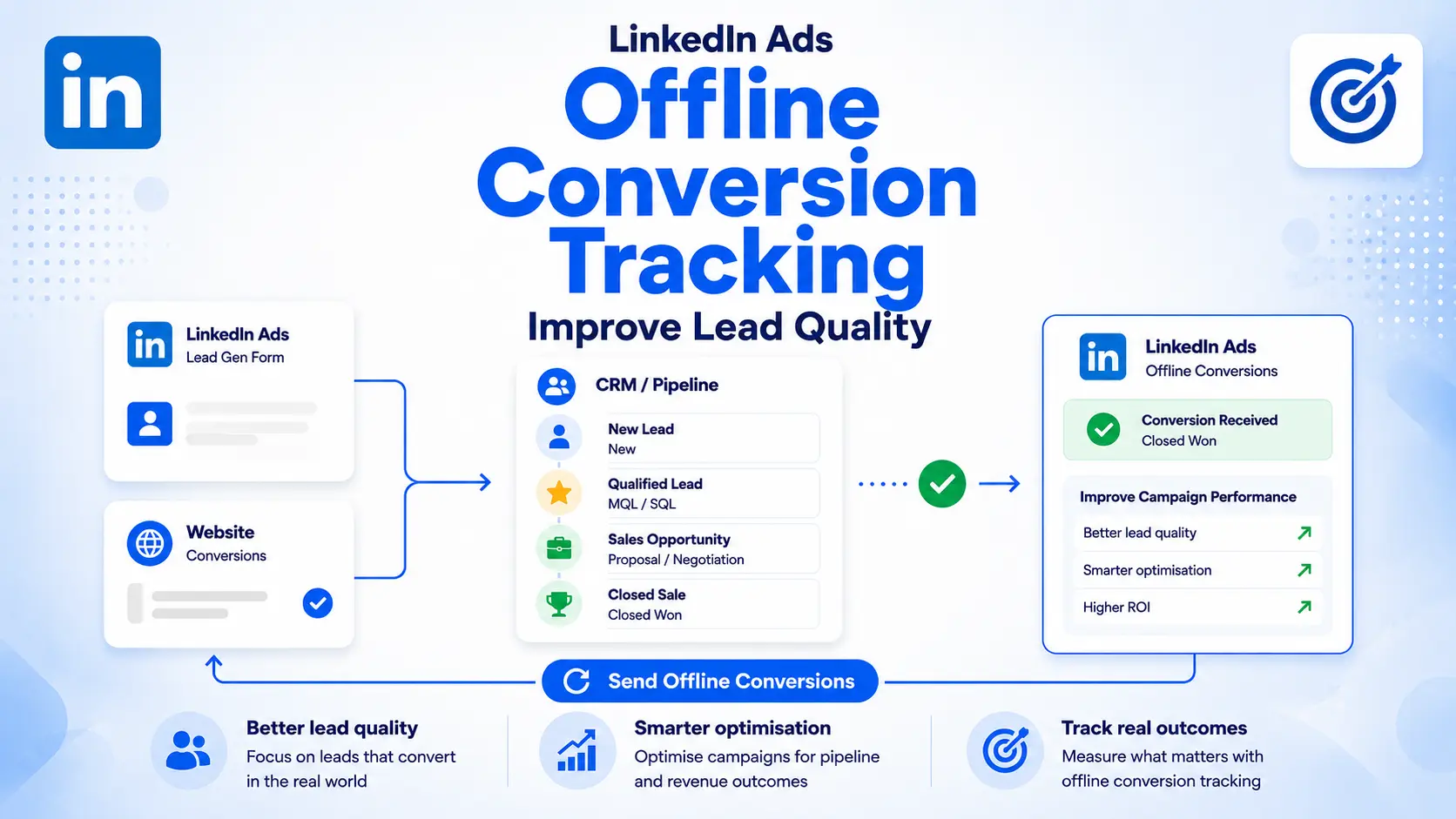
LinkedIn Ads can generate form submissions, demo requests and content downloads, but an initial conversion rarely tells you whether the advertising has created genuine commercial value.
A campaign might produce a low cost per lead while attracting students, jobseekers, consultants, competitors or people without the authority, budget or intention to buy. Another campaign may generate fewer and more expensive enquiries but create substantially more qualified opportunities and revenue.
Website conversion tracking cannot reveal this difference on its own. LinkedIn must receive information about what happens after the initial enquiry.
LinkedIn Ads offline conversion tracking connects later business outcomes—such as qualified leads, appointments, opportunities, signed contracts and sales revenue—with the advertising interactions that influenced them. This creates a feedback loop between LinkedIn Campaign Manager, your CRM and your sales process.
A modern implementation can use:
LinkedIn CRM Sync
A native CRM integration
Make
Zapier
LinkedIn’s direct Conversions API
Google Tag Manager and server-side tracking
Specialist data and attribution platforms
Scheduled CSV uploads
The appropriate method depends on your CRM, conversion volume, technical resources, reporting requirements and the degree of control you need.
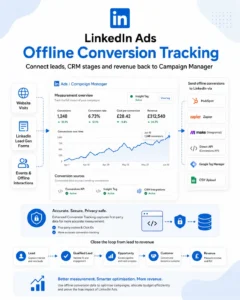
What Is LinkedIn Ads Offline Conversion Tracking?
Offline conversion tracking sends customer and sales outcomes from an external system back to LinkedIn.
Despite the name, the conversion does not have to happen in a physical location. LinkedIn now distinguishes primarily between:
Insight Tag conversions: Actions measured on your website using the LinkedIn Insight Tag, Website Actions, page-load rules or event-specific tracking.
Conversions API or CSV conversions: Events supplied by a server, CRM, automation platform, data platform or uploaded file.
An imported conversion could therefore represent:
A lead qualified by your sales team
A discovery call completed
A meeting booked or attended
A quote requested
A sales opportunity created
A contract signed
A telephone sale
An in-store purchase
A customer acquired after a LinkedIn Lead Gen Form submission
Revenue recorded several weeks after the original enquiry
LinkedIn’s Conversions API can receive both online and offline events. It is better understood as a server-to-server data connection than as a system limited to traditional offline sales.

Why Initial Lead Tracking Is Not Enough
The initial lead is usually the easiest event to measure, but it is often a poor representation of business performance.
Suppose two campaigns each spend £5,000:
Campaign A generates 100 leads at £50 each, but only five become qualified.
Campaign B generates 50 leads at £100 each, but 20 become qualified.
Campaign A appears more efficient when judged by cost per lead. Campaign B is substantially better when judged by cost per qualified lead.
If Campaign B also produces six customers while Campaign A produces one, optimising towards the cheapest initial enquiry would direct budget towards the weaker campaign.
This is particularly important on LinkedIn because accurate professional targeting does not necessarily indicate current buying intent. Someone may have the correct job title, seniority and employer but no immediate need for your service.
Our guide to bottom-of-the-funnel LinkedIn Ads explains why audience fit, commercial intent and CRM outcomes must be evaluated separately.
What Offline Conversion Tracking Can Improve
Offline conversion data can support several different functions inside LinkedIn’s advertising ecosystem.
These benefits should not be treated as identical. An event being available for reporting does not automatically mean every campaign can optimise directly towards it.
More Accurate Campaign Reporting
Imported conversions reveal which campaigns and adverts influenced later sales outcomes.
Instead of reporting only:
Leads
Cost per lead
Website conversion rate
You can analyse:
Qualified leads
Cost per qualified lead
Opportunities
Pipeline value
Customers
Customer acquisition cost
Revenue
Return on ad spend
This makes it easier to distinguish campaigns that generate activity from those that create commercial value.
Qualified Lead Optimisation
LinkedIn offers a qualified-leads optimisation goal for eligible lead-generation ad sets. It uses qualified-lead information supplied through Conversions API or supported CRM Sync connections.
The important limitation is that this is not a universal setting for every LinkedIn campaign. The ad set must use the Lead Generation objective and its adverts must have an associated LinkedIn Lead Gen Form.
LinkedIn recommends supplying at least five qualified leads every one to two weeks to support learning. Where volume is too low, the event may remain valuable for reporting and manual decision-making even if there is insufficient data for dependable algorithmic optimisation.
LinkedIn also recommends selecting one qualified-lead source—either Conversions API or connected CRM data—to prevent duplicate or inconsistent signals. See LinkedIn’s current qualified-lead optimisation requirements.
Conversion Value Optimisation
LinkedIn can also optimise eligible ad sets towards total conversion value rather than conversion volume.
This requires:
Maximum Delivery bidding
Conversion value selected as the optimisation goal
Associated conversions containing suitable values
At least two distinct conversion values above zero
An eligible Sponsored Content format
Dynamic values can be supplied through Conversions API, or different fixed values can be assigned to separate conversion events. LinkedIn’s conversion value optimisation guidance explains the current eligibility requirements.
This is useful when customers have materially different values. However, revenue-based optimisation requires enough accurate conversion and value data. It should not be enabled simply because a CRM contains a revenue field.
Revenue Attribution
CRM data can also support LinkedIn’s Revenue Attribution Report in Business Manager. This report connects CRM information with LinkedIn advertising activity to show metrics such as:
Pipeline generated
Revenue influenced
Win rates
Return on ad spend
Funnel progression
Average deal size
Revenue attribution is related to conversion tracking, but it is not a substitute for a disciplined attribution model. LinkedIn can show associations between advertising and recorded sales; it cannot prove that every attributed sale was caused by the advertising.
See our dedicated guide to the LinkedIn Ads Revenue Attribution Report for a deeper explanation.
Online and Offline Conversion Tracking Work Together
Offline conversion tracking should usually complement the LinkedIn Insight Tag rather than replace it.
The Insight Tag measures website activity such as:
Landing-page visits
Form submissions
Registrations
Downloads
Purchases
Important page views
Other website events
The Conversions API or CRM connection supplies information that may only become available later:
Lead qualification
Appointment attendance
Opportunity creation
Quote acceptance
Closed sales
Revenue
A practical measurement structure could include:
Website lead: Captured by the Insight Tag or LinkedIn Lead Gen Form.
Qualified lead: Sent from the CRM when the lead meets an agreed qualification standard.
Sales opportunity: Sent when a genuine commercial opportunity is opened.
Customer or purchase: Sent when the sale is completed, ideally with the actual revenue value.
This produces a complete progression from advertising engagement to revenue.
Our LinkedIn Insight Tag and conversion tracking guide covers the website side of the implementation.
Design the CRM Funnel Before Building the Integration
The quality of the integration cannot exceed the quality of the underlying CRM process.
Before choosing Zapier, Make or an API, define what each conversion actually means.
A useful structure for a B2B service company might be:
Lead: A legitimate new enquiry with usable contact information.
Qualified lead: The company fits the target profile, has a relevant requirement and is suitable for sales follow-up.
Sales opportunity: A genuine potential purchase has been identified, with an expected value and sales process.
Customer: The opportunity has been won.
Revenue: The actual or appropriately recognised sales value.
The criteria must be consistent. If one salesperson marks any booked call as qualified while another requires confirmed budget and authority, the data supplied to LinkedIn will be unreliable.
Avoid sending every minor CRM update as a conversion. Events such as “email sent”, “note added” or “salesperson assigned” may be operationally useful but are not necessarily meaningful advertising outcomes.
The strongest feedback signals are:
Commercially significant
Applied consistently
Recorded promptly
Frequent enough to analyse
Difficult to reverse
Clearly distinguishable from the initial lead
LinkedIn Offline Conversion Tracking Integration Methods
There is no single best implementation for every company. The main options differ in cost, flexibility, maintenance and technical complexity.
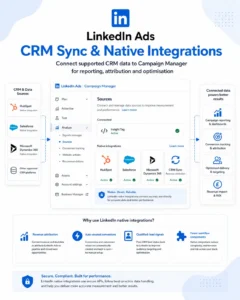
LinkedIn CRM Sync
CRM Sync is LinkedIn’s native connection for bringing supported CRM data into Business Manager and Campaign Manager.
It can unlock:
Revenue reporting
The Revenue Attribution Report
Auto-created conversions
CRM-based funnel visibility
Qualified-lead optimisation where eligible
Salesforce can currently be connected directly through Campaign Manager. HubSpot and Microsoft Dynamics 365 connections are available through Business Manager. The ad account must be owned by or appropriately connected to a LinkedIn Business Manager, and the person configuring the integration needs suitable permissions.
CRM Sync is often the strongest option when:
Your CRM is directly supported
Revenue attribution is a priority
You want fewer third-party workflow components
Your CRM structure is sufficiently clean
You are comfortable sharing the supported CRM objects and fields
It may be less suitable when you need highly selective event logic, extensive transformation, data from several systems or a CRM that LinkedIn does not support natively.
LinkedIn provides current instructions for connecting CRM data through Campaign Manager and Business Manager.
Native HubSpot Conversion Sync
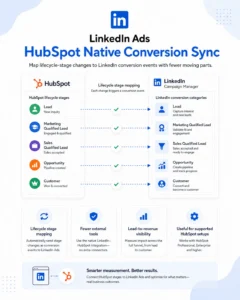
HubSpot provides a direct method for sending lifecycle-stage changes to LinkedIn through the Conversions API. This is separate from using HubSpot as the trigger in Zapier.
The integration is available to HubSpot Marketing Hub Professional and Enterprise users. Conversion events are created from HubSpot’s ads tool, after which corresponding conversion rules appear in LinkedIn Campaign Manager.
HubSpot lifecycle stages are mapped to LinkedIn conversion categories. For example:
Marketing Qualified Lead and Sales Qualified Lead map to Qualified Lead
Opportunity maps to Request Quote
Customer maps to Purchase
Native HubSpot conversion sync is usually preferable when it meets the required use case because it reduces the number of external systems involved. Zapier or Make can still be useful when the event depends on custom properties, deal associations, multiple objects or more complex conditional logic.
Read our broader LinkedIn Ads CRM integration guide before deciding how CRM objects and lifecycle stages should be mapped.
Make and LinkedIn Conversions API
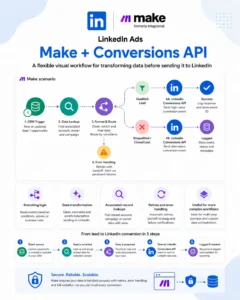
Make is an officially supported LinkedIn Conversions API integration. It can receive an event from a CRM, database, booking platform, ecommerce system or webhook, transform the data and send the conversion to LinkedIn.
A typical Make scenario might:
Watch for a deal-stage change in the CRM
Confirm that the contact originated from or is eligible for LinkedIn attribution
Retrieve associated contact and company information
Map the CRM stage to the correct LinkedIn conversion rule
Format the conversion time
Add the conversion value and currency
Generate or retrieve a unique event ID
Send the event through the LinkedIn Conversions API module
Record the response in a log or CRM property
Make is particularly useful when:
The workflow contains multiple branches
Several records must be retrieved or combined
Data requires formatting or transformation
Webhooks are involved
You need error handlers, retries or data stores
The source application is not directly supported by LinkedIn
You want more control over operations and workflow structure
Within Campaign Manager, create a Conversions API conversion, choose Make as the integration and associate the required ad sets. In Make, add the LinkedIn Conversions API module, connect the LinkedIn account and use the Send Conversion Events action.
LinkedIn’s Make integration instructions confirm that each new conversion rule must also be configured in the corresponding Make scenario.
Zapier and LinkedIn Conversions
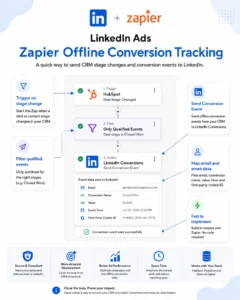
Zapier provides one of the quickest ways to connect a CRM or sales application to LinkedIn’s Conversions API.
The basic structure is:
A CRM or application event starts the Zap.
Zapier checks any required conditions.
The LinkedIn Conversions action sends the conversion event.
For example, a Pipedrive workflow could use:
Trigger: Deal stage updated
Filter: New stage equals Qualified, Proposal Sent or Won
Action: Send Conversion Event through LinkedIn Conversions
A HubSpot workflow might use:
Trigger: Deal property or lifecycle stage changed
Filter: The record has entered the required stage
Action: Send Conversion Event to the corresponding LinkedIn conversion rule
Data mapped into the LinkedIn action can include:
Email address
First and last name
Company
Job title
Country
LinkedIn first-party advertising identifier, where available
Lead Gen Form response identifier, where applicable
Conversion time
Event ID
Conversion value
Currency
Zapier is well suited to straightforward workflows and broad application support. Make is often more flexible for multi-step data retrieval, complex branching, transformation and higher-volume processing.
The decision should be based on the workflow rather than a blanket preference for either platform. Our dedicated Zapier LinkedIn offline conversion tracking guide covers the Zapier implementation in greater detail.
Direct LinkedIn Conversions API
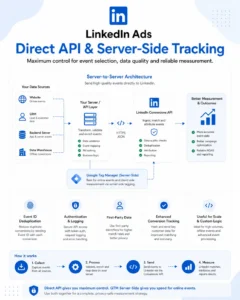
A direct API connection sends events from your server, data warehouse, CRM middleware or internal application to LinkedIn’s /conversionEvents endpoint.
This route offers the greatest control over:
Event selection
Data validation
Batch processing
Authentication
Retry logic
Logging
Deduplication
Data governance
Integration with internal systems
It is usually appropriate when:
Conversion volume is high
The business has developer resources
Data comes from proprietary systems
Events require complex business rules
Automation-platform fees would become excessive
The company wants to minimise additional processors
Reliability and observability are critical
A direct build also introduces ongoing responsibilities. Access tokens, API version changes, failed requests, schema changes and permission errors must be monitored and maintained.
Each conversion event should contain the conversion rule, event time and suitable user identifiers. Optional information can include a dynamic monetary value and a unique event ID for deduplication.
LinkedIn’s Conversions API schema documents the currently supported fields.
Google Tag Manager and Server-Side Tracking
Google Tag Manager can be used as a LinkedIn Conversions API source. This is particularly useful for server-side website conversion tracking and strengthening the collection of online events.
A server-side implementation can improve control over:
Event construction
First-party data collection
Browser restrictions
Event deduplication
Data sent to individual advertising platforms
However, Google Tag Manager does not automatically know that a lead became qualified several weeks later. CRM or backend data must still reach the server container or another integration before later sales events can be transmitted.
GTM is therefore strongest for online server-side measurement. Make, Zapier, CRM Sync or a direct backend connection is often more practical for delayed CRM lifecycle events.
Specialist Data and Attribution Platforms
LinkedIn also supports integrations with platforms including Dreamdata, Factors.ai, Hightouch, Segment, Tealium, Funnel, Supermetrics, Adobe and Salesforce Data 360.
These systems can be useful when a company needs:
Multi-touch B2B attribution
Warehouse-based event activation
Customer data platform integration
Identity resolution
Data from multiple marketing and sales systems
Centralised governance across several advertising platforms
Reporting beyond Campaign Manager
For a small company with one CRM and a modest conversion volume, these platforms may be unnecessary. For a larger B2B organisation with complex account journeys, multiple buying roles and long sales cycles, they can provide capabilities that a simple two-step automation cannot.
Manual CSV Uploads
LinkedIn still supports manual conversion uploads using its CSV template.
A CSV upload can be useful for:
Testing a conversion framework before building automation
Occasional retail or event data
Historical reconciliation
Low conversion volumes
Companies without developer or automation resources
The file must follow LinkedIn’s required schema. It can contain up to 300,000 rows or 20 MB, and conversion timestamps cannot be more than 90 days old. LinkedIn recommends uploading refreshed data daily or weekly.
CSV is inexpensive but operationally fragile. Uploads can be forgotten, formatting errors can invalidate rows and delayed data reduces its usefulness for optimisation. Automated delivery is normally preferable once the process has been validated.
LinkedIn publishes the current CSV conversion template requirements.
Make, Zapier, Native Integration or Direct API?
The most appropriate route depends on the existing technology and the complexity of the required event logic.
Use CRM Sync when you have a supported CRM and want native revenue reporting, auto-created conversions and broader LinkedIn CRM functionality.
Use a native CRM conversion integration when it supports the exact lifecycle events you need with minimal configuration.
Use Zapier for relatively straightforward workflows and rapid implementation across commonly supported applications.
Use Make when the workflow requires branching, transformations, associated-record lookups, webhooks or more detailed operational control.
Use Direct API when scale, reliability, governance or custom logic justifies development and maintenance.
Use GTM server-side primarily when strengthening online event tracking or when website events already pass through a server container.
Use a specialist partner when conversions are part of a wider warehouse, customer data platform or B2B attribution architecture.
Use CSV uploads for testing, occasional reconciliation or very low-volume requirements.
Do not add Zapier or Make merely because they are familiar. If a reliable native connection supports the required objects, fields and event logic, it will usually reduce maintenance. Conversely, a native integration should not be selected when it cannot express the company’s real qualification process.
How LinkedIn Matches Imported Conversions
LinkedIn must match an imported event with a member or advertising interaction before it can attribute the conversion.
Supported matching information can include:
SHA-256 hashed email
LinkedIn first-party ads tracking UUID
IP address for appropriate event types
First name
Last name
Company
Job title
Country
LinkedIn Lead Gen Form response identifier
An advertiser-supplied external identifier alongside standard identifiers
Email is particularly important for lead and CRM events. Sending additional accurate identifiers can improve signal quality, but more data is not automatically better if the values are outdated or incorrect.
Business email addresses can also create practical matching limitations. A prospect may use one address in a LinkedIn profile and another when submitting a form. Names, employers and titles can help, but imported conversion tracking should never be expected to produce a perfect match rate.
LinkedIn provides signal-quality diagnostics in Campaign Manager. A low match rate often indicates missing, unsuitable or incorrectly formatted identifiers.
Capture Attribution Data at the First Conversion
Later CRM stages are only useful if the original lead record contains enough information to preserve the advertising connection.
For website leads, consider storing:
Original source
Latest source
Campaign and advert UTMs
Landing page
Referrer
LinkedIn click or first-party tracking identifiers where available
Form name
Conversion time
Consent status
CRM contact, company and opportunity associations
For LinkedIn Lead Gen Forms, retain the LinkedIn lead response information and connect the lead with the correct CRM contact and opportunity.
Do not overwrite original attribution fields every time a prospect returns to the website. First-touch, latest-touch and opportunity-source fields serve different reporting purposes and should be maintained separately.
Use Event IDs to Prevent Duplicate Conversions
The same action may be sent through more than one tracking route.
For example, a purchase could be recorded by:
The LinkedIn Insight Tag
A server-side GTM event
The CRM
Make or Zapier
A direct API integration
Without deduplication, LinkedIn could count the same commercial event more than once.
Use a stable, unique event ID for the same underlying event across all relevant sources. Suitable IDs could be derived from an order number, transaction ID or a controlled combination of the record and event type.
A random new ID generated every time an automation retries will not deduplicate the event. The retry must reuse the original ID.
LinkedIn recommends using EventID when the Insight Tag and Conversions API report the same conversion.
Assign Conversion Values Carefully
Conversion value can represent either actual revenue or an estimated business value.
For completed purchases, use the recognised transaction value appropriate to the reporting model. Decide whether the amount should include:
VAT
Delivery
Refunds
Recurring revenue
Contract value
Gross or net revenue
Estimated lifetime value
For earlier funnel stages, a weighted value can be used:
Estimated qualified-lead value = average customer revenue × lead-to-customer rate
If an average customer is worth £10,000 and 10% of qualified leads become customers, the estimated qualified-lead value is £1,000.
This can improve comparative reporting, but estimated pipeline values should not be presented as realised revenue. Keep expected value, pipeline value and closed revenue as separate measures.
Choose Attribution Windows That Reflect the Sales Cycle
LinkedIn allows click-through and view-through attribution windows to be configured for conversion rules. Longer windows can capture delayed B2B sales, but they can also give LinkedIn credit for conversions only loosely associated with the advertising.
LinkedIn recommends long windows for many imported conversions and supports extended windows for certain conversion categories. That does not mean the longest available window is always the most credible choice.
Consider:
Typical time from lead to qualification
Typical time from opportunity to sale
Frequency of repeat website visits
The role of other marketing channels
Whether post-view conversions are being evaluated separately
How often the same target accounts encounter LinkedIn advertising
For high-consideration B2B campaigns, compare post-click, post-view and CRM attribution rather than relying on one combined headline figure.
Common Offline Conversion Tracking Mistakes
Sending the Initial Lead Twice
If an initial website form is already measured by the Insight Tag, do not send the same event again through Conversions API without a shared event ID and correct deduplication.
Optimising Towards an Event With Too Little Volume
A closed sale may be the most valuable outcome but occur too infrequently for dependable optimisation. A qualified lead may provide a better balance between commercial quality and event volume.
Treating Every CRM Stage as a Conversion
Too many weak or overlapping events make reports difficult to interpret and can send conflicting signals. Select a small number of commercially meaningful milestones.
Using Inconsistent Qualification Rules
LinkedIn cannot correct inconsistent CRM data. Define the qualification criteria and train the sales team before using the event for optimisation.
Confusing Attribution With Causation
A conversion attributed to LinkedIn occurred within the configured attribution rules. This does not prove that LinkedIn caused the sale or deserves all the credit.
Ignoring Reversed or Refunded Outcomes
A won opportunity that is later cancelled should not remain indistinguishable from durable revenue. Where practical, establish how refunds, cancellations and duplicate opportunities will be handled in business reporting.
Sending the Wrong Revenue Figure
Deal value, annual contract value, lifetime value, cash collected and gross revenue are not interchangeable. Use a documented definition consistently.
Failing to Monitor the Integration
An automation can remain switched on while silently failing because of expired permissions, renamed CRM stages or changed field formats. Monitor conversion status, event volume, match quality and error logs.
Privacy, Consent and Data Governance
Conversions API improves server-to-server reliability, but it is not exempt from privacy requirements.
Businesses remain responsible for determining:
The lawful basis for processing
Whether consent is required
What information must appear in the privacy notice
Which customer data may be shared
How data subject requests will be handled
Whether international transfers and processors are appropriately documented
How long source data should be retained internally
LinkedIn hashes email addresses using SHA-256 and deletes event-level Conversions API data after its stated retention period, while aggregate reporting remains. Hashing is a security measure; it does not automatically remove the need for an appropriate legal basis.
UK advertisers should assess the implementation against UK GDPR, PECR, their consent-management configuration and their own legal advice.
How to Set Up LinkedIn Offline Conversion Tracking
A dependable implementation normally follows this sequence.
Define the Commercial Events
Choose the small number of lifecycle stages that represent meaningful improvements in lead quality or revenue.
Confirm the Source of Truth
Decide whether the contact, company, deal, order or another CRM object controls each event.
Choose the Integration Route
Evaluate CRM Sync, a native connection, Make, Zapier, direct API, GTM, a specialist platform or CSV.
Create the Conversion Rules
In Campaign Manager:
Go to Measurement and Conversion Tracking.
Create a Conversions API or CSV conversion.
Select the correct conversion category.
Configure fixed or dynamic value handling.
Select the click and view attribution windows.
Choose the attribution model.
Associate the correct ad sets.
A conversion is only tracked for the ad sets to which it is attached.
Build the Trigger Logic
Configure the CRM or source system to trigger only when the record first enters the required state.
For example:
Deal stage changes to Qualified
Opportunity changes to Closed Won
Appointment status changes to Attended
Order payment status changes to Paid
Map the Event Data
Send the correct:
Conversion rule
Event time
Matching identifiers
Event ID
Value
Currency
CRM or order reference where supported
Test With Controlled Records
Use a small number of known test cases. Confirm that:
The automation triggers once
Required identifiers are present
Values use the correct currency
Event IDs remain stable during retries
LinkedIn receives the event
The conversion status becomes active
Duplicate events are not counted
Monitor Signal Quality and Volume
Review Campaign Manager’s conversion status and signal-quality information. Compare received event counts with the source system and investigate sudden changes.
A Practical LinkedIn Ads Measurement Framework
For many B2B lead-generation advertisers, the following structure provides a useful starting point:
Primary online conversion: Valid Lead Gen Form submission or website enquiry
First offline conversion: Qualified lead
Second offline conversion: Sales opportunity
Final offline conversion: Customer or purchase with actual revenue
Business reporting: Cost per qualified lead, cost per opportunity, customer acquisition cost, pipeline, revenue and ROAS
The qualified-lead event is often the most useful optimisation signal because it occurs earlier and more frequently than a completed sale while still representing substantially more value than a raw form submission.
The customer and revenue events remain essential for commercial reporting, campaign evaluation and conversion-value strategies when sufficient data is available.
For a wider cross-platform approach, see our guide to CRM advertising with Google, Facebook and LinkedIn.
Improve LinkedIn Lead Quality, Not Merely Lead Volume
Offline conversion tracking does not rescue weak targeting, an unsuitable offer or a poor sales process. It provides better evidence and better feedback.
The strongest LinkedIn advertising system combines:
A clearly defined ideal customer profile
Targeting based on professional fit and buying context
Relevant creative and offers
Well-designed LinkedIn Lead Gen Forms or landing pages
Accurate Insight Tag tracking
Consistent CRM lifecycle management
Qualified-lead and revenue feedback
Campaign decisions based on pipeline and customers
Our complete LinkedIn Ads targeting guide explains how to build audiences around fit, intent and exclusions before applying conversion data.
Conclusion
LinkedIn Ads offline conversion tracking closes the gap between advertising activity and sales performance.
Instead of judging campaigns only by clicks and initial form submissions, businesses can measure which adverts create qualified leads, opportunities, customers and revenue. Eligible campaigns can also use qualified-lead or conversion-value optimisation to move LinkedIn’s delivery system closer to real business goals.
Zapier remains a practical implementation route, but it is now one option within a much wider integration ecosystem. Make offers an officially supported and more configurable visual workflow; HubSpot and CRM Sync provide native routes for supported systems; direct API integration offers maximum control; GTM strengthens server-side website measurement; and specialist platforms support more complex data and attribution environments.
The right solution is the simplest dependable architecture that can preserve accurate identifiers, apply consistent conversion definitions, prevent duplicates and send meaningful sales outcomes promptly.
One PPC can audit your LinkedIn Ads, CRM and conversion-tracking setup, recommend the most appropriate integration route and implement a closed-loop measurement system built around qualified leads, pipeline and revenue.