
Google Local Services Ads can be one of the most effective advertising formats available to tradespeople and local service businesses. They appear prominently across Google Search and Maps, connect prospective customers directly with verified local providers and charge businesses for leads rather than ordinary ad clicks.
However, Local Services Ads—often shortened to LSAs—are not as simple as setting a weekly budget and waiting for the telephone to ring.
Performance is influenced by bidding, budget, service categories, geographical coverage, reviews, profile quality and, critically, how quickly the business responds to customer enquiries.
A campaign with an excessively low bid may not generate enough leads for Google’s automated bidding to learn. Conversely, an account divided into too many small campaigns can spread its lead volume so thinly that each campaign struggles to optimise effectively.
Local Services Ads are also undergoing their most significant structural change since their introduction. Google is moving them into the main Google Ads platform as a specialised type of Performance Max campaign optimised for pay-per-lead goals.
The management interface and some of the bidding controls will change, but the central proposition remains. Businesses will continue paying for valid leads rather than ordinary clicks, targeting will remain keywordless, and adverts will continue appearing in their established positions across Google Search and Google Maps.
This guide explains how LSA bidding works, how much lead volume a campaign needs, how to improve rankings and when different service categories should be combined or separated. It also covers the forthcoming migration into Google Ads and what businesses should do to prepare.
How Google Local Services Ads Work
Conventional Google Search campaigns use keywords, adverts and landing pages. Local Services Ads use a different model.
Instead of bidding directly on keywords, the business tells Google:
Which services it provides
Which geographical areas it serves
When it is available
How customers can contact it
How much it is prepared to spend
Which bidding strategy it wants to use
Google then matches the business with relevant local searches.
Depending on the category and available features, customers may be able to telephone the business, send a message or submit a booking request directly through the advert.
The advertiser pays when it receives a valid, chargeable lead—not every time somebody views or clicks the advert.
This makes LSAs attractive to local businesses, but paying per lead does not guarantee that every enquiry will be qualified or become a customer.
A charged lead may still be:
Difficult to contact
Unsuitable for the business
Looking for a service the company does not provide
Comparing several providers
Price-sensitive
Outside the preferred type of work
Unlikely to become a completed job
The real objective is therefore not to generate the lowest possible cost per lead. It is to generate profitable completed jobs at a sustainable customer acquisition cost.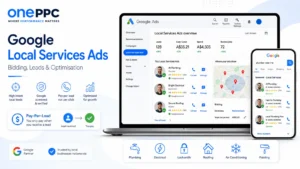
How Bidding Works for Local Services Ads
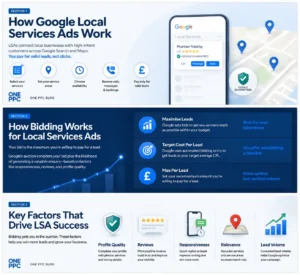
A bid represents the maximum amount the business is prepared to pay for a lead.
When several eligible local businesses compete for the same potential customer, their bids contribute to determining the value of that lead and the order in which provider profiles appear.
A more competitive bid can improve visibility and move the advert higher in the results. However, Local Services Ads are not simply won by the highest bidder.
Google’s auction also considers the likelihood that a particular profile will generate a customer enquiry. Factors include responsiveness, relevance, reviews, images, verification status and wider profile quality.
A business with excellent reviews and rapid lead handling may therefore outperform a weaker competitor with a similar budget.
Google currently provides three principal bidding modes.
| Bid mode | How it works | Best use |
|---|---|---|
| Maximise Leads | Google automatically sets bids to generate as many leads as possible within the budget | Recommended starting point for most advertisers |
| Target Cost Per Lead | Google uses automated bidding with an optional average CPL target | Useful after establishing a realistic lead-cost baseline |
| Max Per Lead | The advertiser manually sets the maximum amount it is willing to pay for a lead | Provides direct control but can restrict volume |
Google recommends Maximise Leads for both single-category and multi-category advertisers. Manual Max Per Lead bidding will be removed when campaigns migrate into the main Google Ads interface.
Google explains the existing bidding options in its Local Services Ads bidding guidance.
Why Lead Volume Matters
Automated bidding needs data.
If a campaign receives only one or two leads per week, an individual expensive, irrelevant or unusually valuable enquiry can dramatically distort the reported average.
Google recommends setting a budget capable of generating approximately ten leads per week when using Maximise Leads. It also advises allowing around two weeks for the model to adjust and produce more representative results.
This does not mean that ten weekly leads are a technical requirement. A campaign can operate with fewer. It means that higher lead volume generally gives Google more evidence with which to make bidding decisions.
A sensible initial objective is:
Approximately ten charged leads per week
Around 20 leads during the first two weeks
Preferably 30–50 leads before making substantial long-term Target CPL decisions
The 30–50 range is a practical optimisation benchmark rather than a published Google requirement. Our guide to training Google Ads AI explains why conversion volume and conversion quality both matter to machine-learning campaigns.
Lower-volume campaigns can still succeed, particularly in specialist or high-value markets, but their results will take longer to stabilise. Their average CPL will also be more sensitive to individual leads.
It is equally important to understand what Google calls a conversion.
After migration, the Google Ads Conversions column will represent the number of leads for which the advertiser was charged. It will not necessarily represent qualified leads, appointments, quotations, completed jobs or customers. This distinction should be reflected in the account’s primary and secondary conversion settings.
Set a Budget That Can Support the Required Lead Volume
The campaign budget and expected CPL need to be commercially compatible.
Use the following plain-text calculation:
Indicative weekly budget = Expected CPL × Desired weekly leads
For example, if the expected CPL is £40 and the objective is ten weekly leads:
£40 × 10 leads = £400 per week
The indicative weekly budget would therefore be £400.
This does not guarantee that the campaign will generate ten leads. Search demand, service category, location, competitors, profile quality and the number of available customer enquiries will all affect delivery.
A larger budget cannot manufacture searches that do not exist.
However, a campaign cannot realistically target ten £40 leads per week with a £100 weekly budget. The budget itself would prevent the system from reaching the desired volume.
Start by Maximising Leads—Not Minimising CPL
One of the most common mistakes is launching a new campaign with an unrealistically low maximum bid or Target CPL.
Suppose Google estimates that leads in a particular market cost approximately £50. Setting a £25 target may appear financially disciplined, but it can prevent the campaign from entering enough auctions to collect meaningful performance data.
The campaign may then generate very few leads, leaving both the advertiser and Google with insufficient evidence to determine which enquiries are most valuable.
A better launch strategy is:
Calculate the maximum commercially affordable budget.
Begin with Maximise Leads.
Avoid imposing an unnecessarily restrictive Target CPL.
Allow approximately two weeks for initial learning.
Accumulate a meaningful number of charged leads.
Measure qualified leads, bookings and completed jobs.
Introduce or reduce the Target CPL gradually.
The initial objective is to generate as many appropriate leads as possible within a controlled budget.
The objective is not to force Google towards the lowest imaginable CPL before the campaign has established what a normal lead costs.
Reduce the Target CPL Gradually
Once the campaign has generated approximately 30–50 leads and established a reasonably stable baseline, the Target CPL can be reduced carefully.
Changes of approximately 10–15% at a time are normally more sensible than dramatic reductions.
For example:
Starting Target CPL: £60
First 10% reduction: £54
Second 10% reduction: approximately £49
Further reduction: only if lead volume remains healthy
The calculation for the first reduction is:
£60 × 90% = £54
The calculation for the second reduction is:
£54 × 90% = £48.60
This can be rounded to approximately £49.
Reducing the target directly from £60 to £35 could substantially restrict auction eligibility and lead volume.
After every significant change, allow time for results to stabilise. If the number of qualified leads or completed jobs falls disproportionately, the lower target may be less commercially effective despite producing a better-looking CPL.
How Weekly Lead Targets Are Determined
The weekly lead target shown inside Local Services Ads is an estimate of how many enquiries the campaign could generate.
It is influenced by:
Bidding mode
Maximum or Target CPL
Weekly budget
Available local search demand
Selected service categories
Geographical coverage
Competitor activity
Profile quality
Advert eligibility
When using Max Per Lead or Target CPL, the bid can restrict the weekly lead target.
A business may have a substantial budget but still receive limited exposure because its maximum or target bid is not competitive enough.
Similarly, a competitive bid cannot overcome a budget that becomes exhausted after only a small number of leads.
The bid determines how competitively the business can enter auctions. The budget determines how much total demand the campaign can afford to capture.
How to Change the Bid in the Current LSA Interface
Before migration, advertisers can change their bidding method from the Local Services Ads lead inbox.
The current process is:
Sign in to the Local Services Ads lead inbox.
Open the main menu.
Select Profile & budget.
Select the edit icon within the Budget section.
Choose the preferred bidding method.
Select Next.
Set the weekly budget.
Select Save.
Once an account migrates, budgets and bidding targets will be managed from the campaign settings inside Google Ads.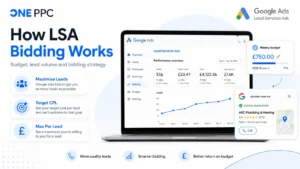
Should Different LSA Services Use Separate Campaigns?
Campaign segmentation is a balance between control and data density.
Separating services provides individual control over:
Budgets
Target CPLs
Locations
Schedules
Lead routing
Reporting
However, every additional campaign divides the available lead volume and conversion data.
Consider a combined home-services campaign generating:
Six plumbing leads per week
Three heating leads per week
Three drainage leads per week
Twelve total leads per week
The combined campaign has a useful amount of weekly data.
If it is divided into three campaigns, none of the individual campaigns reaches Google’s recommended ten-lead level.
This does not automatically make the split wrong. Heating leads might be substantially more valuable than drainage leads and justify a higher Target CPL. Nevertheless, the loss of conversion volume must form part of the decision.
Does Google’s AI Learn Across Separate Campaigns?
Google’s wider machine-learning systems use extensive auction data, search context and historical information. A new campaign is therefore not operating without any wider knowledge.
However, the principal optimisation controls remain campaign-specific:
Budget
Target CPL
Services
Locations
Schedule
Campaign conversion performance
Performance Max campaigns do not support portfolio bid strategies. Separate Performance Max campaigns cannot be placed into one shared Target CPA portfolio that formally pools the bidding target and learning across those campaigns.
Google confirms that portfolio bid strategies are not available for Performance Max campaigns.
Google has not said that the forthcoming pay-per-lead Performance Max campaigns will pool separate campaigns into one unified learning system.
Each campaign should therefore be structured so it can generate sufficient lead volume of its own.
The algorithm may benefit from wider Google and account-level signals, but this should not be confused with a genuinely shared bid strategy.
When to Consolidate Service Categories
Related service categories should generally remain together when they have similar:
Target CPLs
Profit margins
Service areas
Opening hours
Customer values
Sales processes
Operational teams
Lead-conversion rates
Google specifically recommends Maximise Leads for both single-category and multi-category advertisers.
Combining related services is therefore a legitimate strategy, particularly when separating them would create several low-volume campaigns.
When to Split Service Categories
Separate campaigns become more useful when categories require materially different:
Budgets
Target CPLs
Service areas
Operating schedules
Telephone routing
Customer values
Fulfilment teams
Profit margins
For example, emergency plumbing repairs and complete heating-system installations may produce very different customer values.
Treating both categories as if they should achieve the same CPL could cause the campaign to favour the cheaper, lower-value service.
Lead volume should still form part of the decision.
| Expected weekly leads per new campaignPractical interpretation | |
| 10 or more | Strong candidate for separation |
| 5–9 | Potentially viable, but learning may be slower |
| Fewer than 5 | Usually better consolidated unless commercial differences are substantial |
These are practical guidelines rather than fixed Google rules.
A specialist service generating only three leads per week might still deserve a dedicated campaign if each customer is worth several thousand pounds.
What Determines Local Services Ads Rankings?
Google ranks Local Services profiles through an auction that considers both the bid and the likelihood that the profile will produce a customer enquiry.
The main factors include:
| Ranking factor | What it means in practice |
| Bid | More competitive bidding can improve auction position |
| Responsiveness | Missed calls and slow replies can negatively affect performance |
| Search relevance | Selected services and business information should match the enquiry |
| Search context | Google considers service, time, location and other characteristics |
| Reviews | Rating, review volume and customer feedback contribute to profile quality |
| Images | Authentic, high-quality images may improve customer response |
| Verification | Applicable business checks must be completed |
| Contact methods | Calls, messages and eligible booking options create more ways to enquire |
Google also states that stronger profiles may rank higher and may pay lower lead costs. Its Local Services Ads ranking guidance explains these factors in more detail.
Answer Every Lead Quickly
Responsiveness is not merely a sales consideration. Google explicitly includes it as a ranking factor.
Missed calls can negatively affect the profile’s responsiveness.
Businesses should establish a clear process for:
Answering calls
Returning missed calls
Monitoring messages
Routing enquiries to available employees
Recording lead outcomes
Following up unbooked prospects
Customers frequently contact several local providers.
A lead answered within a few minutes will normally have a better chance of becoming a customer than the same enquiry returned several hours later.
Where internal staff cannot provide consistent coverage, overflow call routing or a professional answering service may be commercially justified.
Enable the Right Contact Methods
Telephone calls remain central to many local-service categories, but some customers prefer to send messages.
Enabling message and eligible booking leads creates additional routes through which customers can contact the business.
Google notes that these options can be particularly useful during evenings and weekends, when customers may be willing to send a request without expecting an immediate telephone conversation.
However, every enabled channel must be actively monitored.
Adding message leads and then ignoring them is unlikely to improve long-term performance.
Do Not Advertise 24/7 Unless You Can Respond
Longer advertising schedules can provide access to more demand, particularly for emergency services.
However, selecting 24-hour availability does not automatically improve rankings.
A 24/7 schedule should only be used when the business can:
Monitor incoming enquiries
Answer or return calls quickly
Fulfil genuine emergency work
Maintain service quality outside normal hours
Advertising throughout the night while leaving every enquiry unanswered may damage responsiveness.
The correct schedule is the longest period during which the business can provide reliable lead handling—not necessarily the longest schedule the interface allows.
Select Every Legitimately Relevant Job Type
Local Services Ads are keywordless.
Service categories and job types therefore perform much of the role that keywords play in conventional Search campaigns.
Businesses should select every service they genuinely provide.
Artificially limiting services can reduce relevant exposure, while selecting unrelated categories can generate unsuitable and expensive enquiries.
The objective is broad but commercially accurate coverage.
If a roofing company provides roof repairs, emergency repairs, flat-roof work and complete replacements, all relevant options should be selected.
If it does not provide gutter cleaning, adding that category merely to increase lead volume is unlikely to help.
Remove Unprofitable Services
Generating more leads is only beneficial when the additional work is commercially worthwhile.
Review performance by service and remove categories that repeatedly produce:
Low-value work
Poor qualification rates
Excessive travel
Operational difficulties
Work outside the company’s expertise
Low customer-conversion rates
Unprofitable customers
A smaller number of valuable enquiries can outperform a much larger volume of cheap but unsuitable leads.
Set Accurate Service Areas
Target locations the business can serve reliably and profitably.
Adding overlapping towns, cities and postcodes does not inherently increase rankings. Google already understands geographical relationships, so listing the same coverage in several formats should not be treated as a hidden optimisation technique.
The service area should be broad enough to capture relevant demand but not so wide that travel costs, response times and operational capacity make the leads unprofitable.
Google’s policies also prohibit targeting unreasonably distant locations or areas the business cannot genuinely serve.
Avoid Artificial Business Locations
Do not create virtual offices, false premises or duplicate Google Business Profiles simply to obtain additional local coverage.
Business information must accurately represent where the company is based and how it operates.
Where a company has several legitimate locations serving the same geographical area, Google may show only the highest-ranking advert for a particular search.
Creating overlapping accounts does not guarantee that several versions of the same business will appear simultaneously.
Build a Strong Review Profile
Reviews affect both advert ranking and customer conversion.
A strong profile should have:
A high average rating
A meaningful total number of reviews
Recent reviews
Detailed customer comments
Feedback covering different services
Professional responses from the business
Google recommends having at least five reviews, although businesses in competitive categories may need substantially more to stand out.
Review generation should be continuous.
Asking dozens of customers once a year creates a temporary spike. Requesting feedback after every completed job creates consistent recency and a more natural review profile.
Never Manipulate Customer Reviews
Customer reviews must be genuine and unbiased.
Businesses should not:
Purchase reviews
Review themselves
Ask friends to submit fabricated reviews
Reward customers for positive ratings
Pressure customers to remove negative feedback
Request several reviews for the same job
Review manipulation can result in warnings, suspension or permanent removal from Local Services Ads.
A well-designed review workflow should make it easy for genuine customers to provide honest feedback without attempting to control what they say.
Complete Every Verification Requirement
Local Services Ads depend on business and representative verification.
Requirements vary by category and location but may include:
Identity checks
Business registration
Licence verification
Insurance documents
Representative checks
Google Business Profile ownership
Missing, rejected or expired information can prevent adverts from running.
The person completing the checks should also have the appropriate access to the associated Google Business Profile.
Complete the Entire LSA Profile
A complete profile gives prospective customers more confidence and provides Google with more information about the business.
Review:
Business description
Services
Locations
Opening hours
Telephone number
Logo
Photographs
Business callouts
Contact methods
Verification documents
Profile quality is not merely cosmetic.
Google includes ratings, reviews, response time, images and verification among the information that can influence advert ranking.
Use Authentic, High-Quality Photographs
Upload clear images of:
Employees
Branded vehicles
Equipment
Business premises
Completed projects
Before-and-after results
Authentic photography allows customers to see who will arrive and what standard of work they can expect.
Generic stock photographs may look polished, but they do little to prove that the business has real employees, equipment or experience.
After migration, Google says advertisers will be able to upload up to 100 additional business photographs through the Google Ads assets area.
Review Local Competitors Intelligently
Search for relevant services within the target market and compare the Local Services profiles that appear.
Review:
Rating
Review volume
Review recency
Photographs
Service coverage
Opening hours
Contact options
Business positioning
Visible trust signals
Competitor research can reveal areas where the profile is comparatively weak.
However, do not assume that every visible competitor setting represents best practice.
A competitor advertising 24/7 may be missing most overnight calls. Another may select every available service but receive large numbers of unsuitable leads.
Competitor observation should generate test ideas—not replace commercial evidence.
Record and Classify Every Lead
Every LSA enquiry should be assigned an outcome.
Useful classifications include:
Relevant
Irrelevant
Contactable
Uncontactable
Qualified
Unqualified
Quoted
Booked
Completed
Cancelled
Profitable
Lost
Without this information, the business can only see what Google charged. It cannot determine which services, locations or lead types generated profitable work.
Use Lead Feedback Accurately
When an enquiry is irrelevant or poor quality, use the lead-feedback facility to tell Google what happened.
However, do not report a valid lead as invalid merely because the customer did not purchase.
A genuine customer who compared several providers and selected a competitor may still represent a valid advertising lead.
Google states that lead credits are not available in EMEA. UK advertisers should therefore not assume that reporting an unsuitable enquiry will automatically produce a refund.
Lead feedback should primarily be treated as an optimisation and classification tool.
Measure Cost per Qualified Lead
Google’s reported CPL only shows the average cost of charged leads.
A more meaningful calculation is:
Cost per qualified lead = Total LSA advertising spend ÷ Number of qualified leads
For example, suppose a campaign spends £1,000 and generates 25 charged leads.
Google’s reported CPL would be:
£1,000 ÷ 25 charged leads = £40 per charged lead
If only ten of those leads are genuinely qualified:
£1,000 ÷ 10 qualified leads = £100 per qualified lead
The actual cost per qualified lead is therefore £100.
This provides a fairer comparison with conventional Search campaigns and other lead-generation sources. It also supports a more useful assessment of Google Ads lead quality than the platform-reported CPL alone.
Measure Cost per Completed Customer
The lowest CPL does not necessarily produce the strongest commercial result.
Suppose Campaign A generates leads for £25 but converts only 10% into customers.
Convert 10% into decimal form:
10% = 0.10
The customer acquisition cost is:
£25 ÷ 0.10 = £250 per customer
Campaign B generates leads for £50 but converts 40% into customers.
Convert 40% into decimal form:
40% = 0.40
The customer acquisition cost is:
£50 ÷ 0.40 = £125 per customer
Campaign B has twice the cost per lead but half the customer acquisition cost.
Reducing Target CPL without considering customer quality can therefore move the campaign away from its most profitable opportunities.
Connect LSA Reporting With the CRM
The CRM should follow every LSA lead through the complete customer journey.
Useful data includes:
Lead source
Enquiry date
Service requested
Customer location
Charged lead cost
Qualification status
Quotation
Appointment
Booking
Completed job
Revenue
Gross profit
Repeat revenue
This allows the business to compare service categories, locations and lead types using commercial outcomes rather than surface-level advertising metrics. The same principle underpins offline conversion tracking for Google Ads, where qualified leads, customers and revenue can be connected with their original advertising source.
Calculate the Maximum Affordable CPL
A maximum affordable CPL should reflect gross profit, sales conversion rate and the proportion of gross profit the business can invest in customer acquisition.
Use this calculation:
Maximum affordable CPL = Average gross profit per completed job × Lead-to-customer conversion rate × Percentage of gross profit available for acquisition
Suppose:
Average gross profit per completed job is £500
30% of leads become customers
The business can invest 40% of gross profit in customer acquisition
Convert the percentages into decimals:
30% = 0.30
40% = 0.40
The calculation is:
£500 × 0.30 × 0.40 = £60
The indicative maximum affordable CPL is therefore £60.
This means that, based on these assumptions, the business would spend an average of £60 on leads for every £500-gross-profit customer it acquires.
To confirm the calculation:
£60 CPL ÷ 0.30 lead-to-customer rate = £200 customer acquisition cost
The business was prepared to invest 40% of its £500 gross profit:
£500 × 0.40 = £200
The figures therefore reconcile.
This is more useful than selecting a Target CPL simply because it sounds inexpensive. A sustainable target must reflect customer value, margin and conversion rate. Where reliable values are available, value-based bidding can take this commercial logic further.
The LSA Migration Into Google Ads
Google has announced that Local Services Ads are moving into the main Google Ads platform.
Existing campaigns will be automatically migrated into a specialised Performance Max campaign type designed for pay-per-lead objectives.
The current timetable is:
August 2026: Selected US home and storefront service advertisers
Late 2026: Broader US advertiser groups, including more service-area businesses and accounts with custom configurations
2027: UK, other non-US accounts and remaining business categories
UK advertisers should therefore expect migration during 2027—not by the end of 2026.
Google has published the timeline and operational changes in its official migration guidance.
Google will email the account administrator 14 days before the scheduled migration and send another reminder seven days later.
What Will Not Change
The migrated campaign will retain the principal characteristics of Local Services Ads:
Advertisers will pay for valid leads rather than ordinary clicks
Adverts will continue appearing in eligible Search and Maps positions
Targeting will remain keywordless
Service categories and geographical areas will remain central
Eligible businesses will retain the Google Verified badge
The focus will remain on high-intent local customer enquiries
The Performance Max name should not be interpreted as a move into conventional cross-channel Performance Max advertising.
These specialised campaigns will not automatically begin appearing across YouTube, Gmail, Discover or the Google Display Network.
What Will Change
The principal changes include:
Campaigns will be managed inside Google Ads
Weekly budgets will become average daily budgets
Manual Max Per Lead bidding will be removed
Vertical-level Target CPL or Target CPA controls will be removed
Leads will move into Google Ads Lead Manager
Core information will synchronise from Google Business Profile
Historical campaign reports will not migrate
Advertisers will receive more self-service controls
Better Business Bureau callouts will be discontinued
Google’s current LSA documentation uses the term Target CPL. Its migration documentation refers to the removal of vertical-level Target CPA.
In practical terms, both refer to the average amount the campaign is targeting for a lead or charged conversion.
Weekly Budgets Will Become Daily Budgets
Google will divide the existing average weekly budget by seven.
Use this calculation:
New average daily budget = Existing average weekly budget ÷ 7
For example:
£700 weekly budget ÷ 7 days = £100 average daily budget
The monthly charging limit will then be calculated as:
Monthly charging limit = Average daily budget × 30.4
Using the £100 daily budget:
£100 × 30.4 = £3,040 monthly charging limit
Daily spending may fluctuate when customer demand is higher, but Google states that monthly billing will not exceed the average daily budget multiplied by 30.4.
Advertisers should check the converted budget immediately after migration.
Manual Bidding Will Be Removed
Max Per Lead manual bidding will no longer be supported inside Google Ads.
Businesses will increasingly depend on automated bidding through Maximise Leads and campaign-level Target CPL or Target CPA controls.
The loss of manual control increases the importance of:
Sufficient lead volume
Realistic targets
Accurate service categories
Appropriate campaign consolidation
Strong profile quality
Fast lead handling
Reliable CRM reporting
Businesses will need to guide the system through targets, budgets, structure and commercial data rather than direct manual bids.
Vertical-Level Targets Will Be Removed
Current LSA accounts may have different lead-cost targets for separate service categories inside one campaign.
Google Ads will replace these with a unified campaign-level target.
If plumbing can sustain a £60 CPL but appliance repairs can sustain only £25, the advertiser may need two campaigns to preserve separate targets.
However, this returns the account to the campaign-splitting problem.
If each campaign receives only two or three weekly leads, the additional control may come at the cost of weaker campaign-level data.
The correct structure balances economic differences against sufficient lead volume.
Export Historical Reports Before Migration
Historical campaign-level performance reports will not transfer into Google Ads.
Before migration, export:
Total spend
Charged leads
CPL
Lead types
Service categories
Location performance
Weekly results
Advert-level reports
Historical customer leads will transfer, including available contact details, messages and older call recordings. The historical campaign-reporting data will not.
Once the account has migrated, attempting to access the previous Local Services Ads dashboard will redirect the user to Google Ads.
Audit the Google Business Profile
Google Business Profile will become the source of truth for several core business details, including:
Business name
Physical address
Telephone number
Standard opening hours
Primary business category
These details will synchronise into Google Ads.
Other campaign elements, including service areas and advertising schedules, can be customised independently after migration.
Significant changes to the business name, address or primary category may trigger a verification review.
Google says this generally takes between 24 and 48 hours, during which the campaign may temporarily pause.
Avoid making unnecessary structural changes immediately before migration.
Prepare for a Temporary Stabilisation Period
Google says many campaigns will begin running quickly after migration, but advertisers should allow up to two weeks for the process to complete and performance to return to a stable level.
Check migrated settings immediately, including:
Budget
Target CPL or Target CPA
Service areas
Categories
Advertising schedule
Photographs
Verification status
Correct clear migration errors, but avoid reacting to every early fluctuation with substantial changes.
The BBB Callout Is Being Removed
Better Business Bureau callouts will no longer be supported in migrated campaigns.
Google recommends selecting at least six alternative structured callouts, potentially covering:
Business hours
Specialities
Accepted payment methods
Emergency availability
Service characteristics
Other relevant business details
This removes a particular third-party accreditation callout, which is primarily relevant to US advertisers.
It does not remove the Google Verified badge or mean that BBB information is being eliminated from organic Google Search.
The change is better understood as Google standardising the advert around its own verification programme, Google Business Profile data and advertising assets.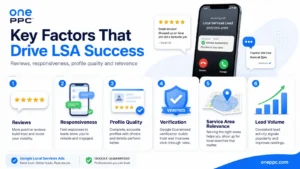
Google Verified Has Replaced the Former Guarantee Positioning
Many UK businesses and customers still refer to LSAs as Google Guaranteed Ads.
Google has now consolidated advertiser badging under Google Verified and discontinued the associated Money Back Guarantee for new eligible work.
Businesses should not publish marketing claims suggesting that customers receive a current Google-backed financial guarantee when that protection no longer applies.
The Google Verified badge remains an important trust indicator, but it should be described accurately.
A Practical LSA Optimisation Schedule
Local Services Ads should be monitored continuously, but optimisation does not require changing bids every day.
A weekly review can cover:
New lead volume
Budget utilisation
Missed calls
Message-response times
Lead relevance
Qualification rate
Bookings
Lost-lead reasons
New customer reviews
A monthly review can cover:
Charged-lead CPL
Cost per qualified lead
Customer acquisition cost
Revenue
Gross profit
Service-category performance
Location performance
Advertising schedules
Target CPL
Campaign structure
Operational capacity
This balance provides active management without introducing constant changes that make results difficult to interpret.
Common Local Services Ads Mistakes
The most common LSA problems include:
Starting with an unrealistically low Target CPL
Providing too little budget to generate meaningful lead volume
Splitting related services into too many low-volume campaigns
Missing calls and replying slowly
Selecting services the business cannot fulfil profitably
Using inaccurate or excessively broad service areas
Advertising outside staffed hours
Ignoring message leads
Allowing reviews to become stale
Uploading weak or generic photographs
Failing to complete verification
Treating every charged lead as a genuine sales conversion
Evaluating CPL without measuring bookings and revenue
Failing to export reports before migration
Assuming the new campaign will behave like standard Performance Max
Most of these problems cannot be solved through bidding alone.
Local Services Ads connect advertising performance directly with the way the business answers, qualifies and fulfils customer enquiries.
Final Thoughts
Google Local Services Ads can give tradespeople and local service businesses prominent visibility at precisely the moment a nearby customer needs help.
But the pay-per-lead model does not remove the need for strategy.
A successful LSA campaign needs enough budget and lead volume for automated bidding to learn. It needs a competitive initial bidding approach rather than an arbitrarily low CPL target.
Related categories should remain consolidated where their economics are similar. They should only be separated when the additional control justifies dividing the available lead volume and campaign data.
The campaign also needs:
Strong customer reviews
Genuine operational availability
Fast responses
Accurate service areas
A complete business profile
High-quality photographs
Reliable CRM reporting
Commercial measurement beyond the initial lead
The forthcoming move into Google Ads does not fundamentally change this formula.
LSAs will remain keywordless, pay-per-lead campaigns limited to Search and Maps. What changes is the management environment: manual bidding disappears, weekly budgets become daily budgets, vertical-level targets are replaced by campaign-level controls, and campaign reporting moves into Google Ads.
Businesses that prepare their data, account structure and lead-handling processes now will be in the strongest position when migration arrives.
The final objective is not the cheapest Google lead. It is the highest sustainable volume of profitable completed work.
Related Blog Posts
Continue exploring Local Services Ads, lead quality, bidding and full-funnel measurement with these related One PPC guides: