
Facebook Ads targeting has changed fundamentally. Advertisers can still define locations, build Custom Audiences, create Lookalike Audiences and use interests or demographics, but targeting is no longer simply a matter of constructing the narrowest possible audience.
Meta increasingly uses machine learning to decide who receives an advert. Under Advantage+ audience, many of the audiences you provide are treated as suggestions that guide delivery rather than fixed boundaries. Meta may search beyond those suggestions when it predicts that doing so will improve the selected campaign result.
This creates a more important question than “Which interests should I target?”:
What combination of audience controls, first-party data, conversion signals, creative and campaign structure gives Meta the best chance of finding profitable customers?
This guide explains the current Facebook and Instagram targeting system, including broad targeting, detailed targeting, Custom Audiences, Lookalike Audiences, remarketing, exclusions and Advantage+ audience. It also shows how to test audiences without confusing cheap clicks or leads with genuine business performance.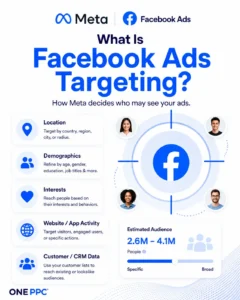
What Is Facebook Ads Targeting?
Facebook Ads targeting is the process of defining or influencing which people may see an advert across Meta placements such as Facebook, Instagram and Messenger.
Targeting can be based on:
Location, age, language and other available audience controls
Demographics, interests and behaviours
Previous engagement with your Facebook Page, Instagram account, adverts or videos
Visits and actions on your website, measured using the Meta Pixel and, where appropriate, Conversions API
Activity within an app, shop, catalogue or lead form
Customer and prospect records supplied from a CRM or customer list
Similarity to an existing source audience through a Lookalike Audience
Meta’s prediction of who is most likely to complete the result selected for optimisation
Targeting does not operate independently. Meta’s delivery system considers the audience alongside the objective, conversion location, performance goal, bid strategy, budget, placements, creative, historical data and expected action rate.
An accurately selected audience cannot compensate for a weak offer, poor creative, the wrong optimisation event or an ineffective landing page. Equally, a strong campaign can underperform when strict audience controls unnecessarily prevent the system from reaching suitable prospects.
How Facebook Ads Targeting Has Changed
Older Facebook advertising strategies focused heavily on finding precise combinations of interests, behaviours and demographics. Advertisers would build many small ad sets, layer multiple criteria with AND conditions and exclude detailed-targeting groups that appeared irrelevant.
That approach is now less reliable for several reasons:
Meta has reduced or removed various detailed-targeting options over time.
Detailed-targeting exclusions are no longer available for new ad sets. Custom Audience exclusions remain available in eligible campaign setups.
Advantage+ audience may expand beyond selected interests, demographics, Custom Audiences and Lookalike Audiences when these are entered as suggestions.
Privacy changes and reduced browser-level observability have made strong first-party and server-side conversion data more valuable.
Creative now performs part of the targeting function. The advert’s message, imagery, offer and format influence who engages and converts.
Campaign consolidation can provide the delivery system with more data than numerous fragmented ad sets.
Meta’s official explanation of Advantage+ audience describes it as a way to use its AI to find an audience. This does not mean every advertiser should remove all controls or accept every automated setting. It means audience decisions should be tested in the context of the full campaign rather than based on audience size or intuition alone.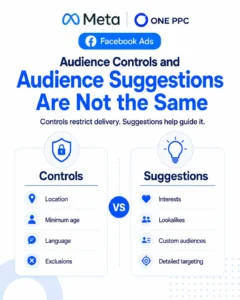
Audience Controls and Audience Suggestions Are Not the Same
This is one of the most important concepts in modern Meta targeting.
Under Advantage+ audience, some settings act as controls. These restrict delivery. Other selections act as suggestions. Meta initially uses them to help find relevant people but may deliver outside them if its system predicts a better result elsewhere.
| Audience setting | Typical role under Advantage+ audience | Practical meaning |
|---|---|---|
| Location | Control | Use it to restrict delivery to the geographical market the business can serve. |
| Minimum age | Control | Prevents delivery below the permitted or commercially appropriate minimum. |
| Language | Control when selected | Useful in specific multilingual situations, but unnecessary language restrictions can reduce reach. |
| Custom Audience exclusion | Control in supported setups | Can prevent current customers, employees or other known groups from receiving an advert. |
| Detailed targeting | Usually a suggestion | Interests, behaviours and demographics can guide delivery without necessarily defining its final boundary. |
| Custom Audience inclusion | Often a suggestion | Meta may use the included audience as a starting signal and expand beyond it. |
| Lookalike Audience | Often a suggestion | The similarity model can guide prospecting while Meta explores beyond it. |
Meta’s guidance on audience controls and suggestions lists location, minimum age, languages and Custom Audiences to exclude among the controls available in relevant Advantage+ setups. The exact interface and available settings vary by objective, campaign type, market and account, so always read the label shown in Ads Manager. If a setting says Meta may go beyond it, do not treat it as a hard restriction.
The Main Types of Meta Advertising Audiences
The most useful way to understand Facebook Ads targeting is to separate prospecting audiences from known or warm audiences.
| Audience type | Typical people included | Primary use |
| Broad audience | People within essential controls, with few or no additional suggestions | Prospecting and scalable acquisition |
| Detailed-targeting audience | People associated with selected interests, demographics or behaviours | Prospecting, research and creative-message testing |
| Custom Audience | Known customers, leads, visitors or Meta engagers | Remarketing, retention, cross-selling and exclusions |
| Lookalike Audience | New people who resemble a selected source audience | Prospecting based on first-party or conversion data |
These are not automatically separate delivery modes. With Advantage+ audience, detailed targeting, Custom Audiences and Lookalike Audiences may all be used as audience suggestions within a broader eligible audience.
Broad Targeting
Broad targeting normally means applying only the controls required by the business, such as the service area and a legitimate minimum age, then allowing Meta to identify likely converters.
Broad does not mean random. Delivery is still influenced by:
The conversion event and performance goal
The advert’s creative, copy and offer
Website, app and CRM event data
Previous campaign performance
Bid and budget settings
Predicted conversion probability
Broad targeting can work well when the potential market is sizeable, the conversion event is reliable and the campaign receives enough meaningful data. It can also reduce fragmentation and give the system more freedom to find lower-cost opportunities.
However, broad targeting is not a universal answer. A niche B2B service, small local catchment area or highly restricted customer profile may require more deliberate controls, stronger qualification and careful creative. Broad delivery also cannot fix a low-quality optimisation signal. If the campaign is trained on unqualified form submissions, it may become efficient at finding more people who submit forms without buying.
Detailed Targeting
Meta detailed targeting includes available demographics, interests and behaviours. Examples may include job-related attributes, life events, topics, hobbies, industries, device behaviours or purchasing-related signals, although availability differs by country and changes over time.
Detailed targeting is useful for:
Giving Meta a sensible starting point for a new campaign
Testing a clear audience hypothesis
Matching a specialist offer to a recognisable interest or life event
Adapting creative to a particular market segment
Reaching a niche audience when broad targeting produces too much irrelevant traffic
Do not assume that a listed interest means someone is an active buyer or has explicitly declared that interest. Meta constructs categories from a range of signals, and the label is not a perfect description of every person included.
It is also a mistake to stack many attributes merely to make an audience look precise. Additional layers can exclude potential customers, restrict learning and make it difficult to understand which assumption actually affected performance.
Our dedicated Facebook interest targeting guide explains how interest-based audiences can be researched and tested in more depth.
Custom Audiences
Custom Audiences let advertisers use permitted first-party data or recorded interactions to reach, analyse or exclude people who already have a relationship with the business.
Common sources include:
Website visitors and people who completed specified website actions
Customer or prospect lists
Facebook Page and Instagram account engagement
Video viewing
Lead form opens or submissions
Shopping and catalogue activity
App activity
Relevant offline or CRM activity
Custom Audiences are commonly described as remarketing audiences, but their use is broader. A current-customer list can support retention advertising, cross-selling, suppression from new-customer campaigns or the creation of a Lookalike Audience. A CRM list can be segmented by lifecycle stage, product, location, recency or value rather than combining every contact into one generic group.
Our Facebook remarketing and Custom Audiences guide covers the main audience sources and campaign uses.
Website Custom Audiences
Website Custom Audiences can include people who visited the whole website, reached particular pages or completed selected actions. The Meta Pixel is commonly used to record browser events, while Conversions API can provide complementary server-side event data.
Useful segments include:
All recent website visitors
Visitors to a particular service or product category
Product viewers who did not purchase
Basket abandoners
Pricing-page visitors
People who began but did not complete a lead form
Existing converters for exclusion or retention
Segment by commercial intent, not simply by what is technically possible. A visitor who spent a few seconds on an informational blog post should not necessarily receive the same advert as someone who reached a pricing page or started checkout.
See our guide to the Meta Pixel and Facebook conversion tracking for implementation considerations.
Engagement Custom Audiences
Meta can build audiences from eligible interactions that occur within its platforms. These can be valuable when website traffic is limited or when video, Instagram and Instant Forms play a major role in the campaign.
Possible groups include people who:
Engaged with a Facebook Page or Instagram professional account
Watched a specified percentage or duration of a video
Opened or submitted an Instant Form
Interacted with an advert
Engaged with eligible shopping or event experiences
Engagement is not the same as purchase intent. Someone who watched a short video or liked a post may still be at the top of the funnel. Match the remarketing message and offer to the strength and recency of the interaction.
Customer-List and CRM Audiences
A customer-list Custom Audience is created by securely supplying permitted identifiers, such as email addresses or telephone numbers, so Meta can attempt to match the records to accounts across its technologies.
The most valuable list is rarely “all contacts”. Better segments might include:
Qualified leads that have not yet purchased
Open sales opportunities
Recent customers
Repeat or high-value customers
Customers of a particular service
Lapsed customers
Unqualified or poor-fit leads for suppression
First-party data is more useful when the CRM is accurate. Duplicates, outdated details, inconsistent lifecycle stages and missing consent records reduce both operational confidence and audience quality.
For lead-generation businesses, Facebook Ads CRM integration can support two related flows: sending leads into the CRM for rapid follow-up and returning qualified-lead, opportunity and customer outcomes to Meta.
Lookalike Audiences
A Lookalike Audience helps reach new people who share characteristics with a selected source audience. The source might be based on customers, qualified leads, purchasers, website events or another eligible Custom Audience.
Source quality matters more than simply making the source as large as possible. A seed of genuine high-value customers can be more commercially meaningful than a much larger list of mixed-quality leads, provided it is sufficiently usable for Meta to model.
Useful Lookalike tests include sources based on:
Closed customers rather than all leads
Qualified leads rather than raw form submissions
Repeat or high-value purchasers
A specific product or service line
Recent converters rather than very old records
Purchase value, where the data and campaign configuration support it
Lookalikes can be tested at different similarity ranges. Smaller ranges generally prioritise closer similarity, while broader ranges provide more reach. The best range depends on the source, market size, location and available budget; it should be decided by commercial performance rather than assumed in advance.
Read our full guide to Facebook Lookalike Audiences for additional examples.
Advantage+ Audience Versus Manual Audience Selection
Advantage+ audience allows Meta to use supplied suggestions and then explore more broadly. Manual or original audience options, when available, provide more direct audience selection, although some expansion features may still apply depending on the campaign.
Neither should win by default.
Advantage+ Audience Is Often a Strong Test When:
There is reliable conversion data
The target market is reasonably broad
The budget is large enough to generate useful learning
The offer and creative naturally qualify the audience
Scale is restricted by narrow interest ad sets
The CRM returns meaningful downstream outcomes
More Controlled Targeting May Be Useful When:
The business serves a tightly defined geographical area
The product is relevant only to a narrow professional or consumer group
Poor-fit leads create material sales costs
Compliance or eligibility rules require firm restrictions
The account has little trustworthy conversion history
A structured experiment needs to isolate a specific audience hypothesis
The practical solution is usually to test material strategic differences rather than switching settings repeatedly. For example, compare a consolidated Advantage+ audience prospecting campaign with a clearly defined interest or Lookalike approach while keeping the offer, conversion event and creative plan comparable.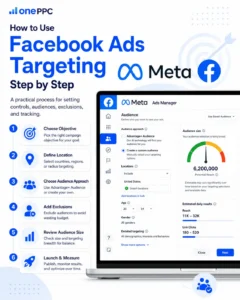
How to Use Facebook Ads Targeting Step by Step
The exact labels in Ads Manager change, but the strategic process remains consistent.
1. Define the Business Outcome
Start with the result the business wants: a purchase, qualified lead, booked appointment, accepted quotation or another commercially meaningful action.
Do not begin with an interest list. The objective, conversion location and performance goal determine what Meta attempts to optimise. Our Facebook campaign objectives guide explains how these settings affect delivery.
2. Define Genuine Eligibility Controls
Identify the boundaries that must be respected, such as:
Countries, regions, towns, postcodes or radius areas the business can serve
A legitimate minimum age
Language requirements where the creative and landing page cannot serve other users
Existing customers or employees who must be excluded
Regulatory and Special Ad Category restrictions
Only use a restriction when it reflects a real business rule. Every unnecessary control removes potential conversions and reduces the system’s room to learn.
3. Prepare First-Party Audiences
Create the Custom Audiences that support the campaign strategy. This may include recent site visitors, product viewers, form openers, past leads, customers and high-value customer segments.
Check that source events are firing correctly and that CRM stages are consistently defined. An inaccurate audience can be worse than no audience because it creates false confidence.
4. Choose the Prospecting Hypothesis
Select the main approach to test:
Broad targeting within essential controls
Advantage+ audience with relevant suggestions
A clearly defined interest or demographic hypothesis
A Lookalike Audience based on high-quality first-party data
Avoid launching numerous slightly different ad sets when the budget cannot support them. Fragmentation slows learning and increases the chance that apparent differences are random noise.
5. Match Creative to the Audience and Funnel Stage
Creative is now part of targeting. A highly specific advert can attract a particular customer type even within a broad audience, while generic creative may attract people who click but never become qualified.
For prospecting, make the problem, customer, offer and qualification criteria clear. For remarketing, acknowledge the user’s likely level of familiarity and address the next barrier to conversion. For existing customers, use a relevant retention, renewal or cross-sell message rather than repeating a new-customer advert.
6. Apply Meaningful Exclusions
Detailed-targeting exclusions are no longer available for new ad sets, but Custom Audience exclusions remain important where supported.
Examples include:
Excluding recent purchasers from new-customer acquisition
Excluding active customers from introductory offers
Excluding employees or internal testers
Excluding confirmed unqualified leads when appropriate and lawful
Separating remarketing from prospecting when the test requires clean measurement
Do not exclude every known audience automatically. Existing customers may be valuable for repeat purchases, referrals, upgrades and brand reinforcement. The exclusion must reflect the purpose of the campaign.
7. Review Estimated Audience and Delivery Warnings
Audience estimates are directional, not forecasts. Use them to identify obvious configuration errors, such as an unexpectedly tiny audience or the wrong country, but do not select an audience solely because the gauge appears “defined” or “broad”.
Review whether each choice is a fixed control or a suggestion. Confirm that any Advantage expansion aligns with the experiment you intended to run.
8. Validate Tracking Before Launch
Test the Meta Pixel, Conversions API, Instant Form or app events used by the campaign. Check event names, parameters, deduplication and the selected dataset.
For lead generation, verify that the initial lead reaches the CRM and that later stages can be reported. Our guide to Facebook Ads offline conversion tracking explains how qualified leads, opportunities, sales and revenue can be sent back to Meta.
9. Measure Commercial Results
Evaluate the metric that reflects the objective, not simply the cheapest visible platform result.
For ecommerce, this may include contribution margin, customer acquisition cost, new-customer revenue and return on ad spend. For lead generation, compare qualification rate, cost per qualified lead, opportunity rate, cost per customer and revenue—not just cost per form submission.
10. Make Evidence-Based Changes
Allow enough time and volume for a meaningful comparison, subject to risk and budget. Avoid editing audiences daily because frequent material changes can destabilise delivery and make the test difficult to interpret.
When results differ, ask whether the cause was genuinely the audience or whether creative, placement, conversion tracking, budget distribution or lead follow-up also changed.
Facebook Ads Targeting Strategies by Business Type
Different businesses require different balances between scale and control.
| Business type | Useful starting approach | Important safeguard |
| Local service business | Tight service-area control with broad or lightly guided prospecting | Measure booked and qualified enquiries; check address and postcode quality. |
| National lead generation | Broad or Advantage+ audience, supported by strong qualifying creative and CRM events | Return qualified-lead and sales outcomes rather than optimising only to raw leads. |
| Ecommerce | Broad or Advantage+ acquisition, catalogue signals and purchaser exclusions where strategically appropriate | Separate new-customer and returning-customer economics. |
| Specialist B2B | Test broad delivery against job, industry, interest or Lookalike hypotheses | Qualify through the advert, form and sales process; Meta is less precise than LinkedIn for professional attributes. |
| High-consideration service | Funnel-stage Custom Audiences and longer nurture windows | Do not treat all site visitors as equally warm; segment by action and recency. |
| Subscription or repeat purchase | Customer, lapsed-customer and high-value segments | Coordinate acquisition exclusions with retention and cross-sell campaigns. |
Location Targeting for Local and Regional Campaigns
Location is usually one of the most commercially important controls for a local business. Meta supports geographical targeting options such as countries, regions, cities, postcodes and radius areas, subject to availability.
Good practice includes:
Targeting the area the business can genuinely serve profitably
Checking border areas and neighbouring regions
Matching location references in the advert and landing page
Separating locations when budgets, offers, capacity or sales teams differ materially
Comparing lead quality and customer acquisition cost by actual customer location
Using form fields or CRM data to validate the service address rather than trusting platform targeting alone
Location targeting is not perfectly precise. People travel, devices move, data can be incomplete and a user’s detected location may not equal the address where a service is required. For high-value local lead generation, validate the postcode or service address in the form or sales process.
Meta provides a current overview of location targeting in Ads Manager.
Remarketing Strategy: Segment by Intent and Recency
One large “all visitors” audience is easy to create but often difficult to use well. A more useful remarketing structure reflects both what the person did and how recently it happened.
| Signal | Likely intent | Example message |
| Viewed general content | Low to moderate | Education, proof and problem awareness |
| Viewed a service or product | Moderate | Benefits, differentiation and relevant examples |
| Reached pricing or initiated a form | High | Objection handling, consultation or reassurance |
| Added to basket or began checkout | High | Product reminder, delivery information or purchase reassurance |
| Became a qualified lead | Sales-stage | Case study, proof, implementation detail or appointment prompt |
| Purchased | Customer | Onboarding, complementary product, renewal or referral |
The appropriate retention window depends on the buying cycle. A short-lived ecommerce purchase may need a short window; a complex B2B purchase may require a longer nurture period. Test recency bands when the audience volume supports it, and avoid creating so many segments that none can deliver efficiently.
Our guide to building a Facebook advertising sales funnel provides more detail on matching campaigns to funnel stages.
Narrowing Audiences with AND and OR Logic
Detailed-targeting selections within the same group commonly operate as OR choices: a person can match one listed item or another. A “narrow further” layer, where available, creates an AND relationship between groups.
For example:
Group one: interest A OR interest B
Narrowed group: AND demographic C OR behaviour D
This can make an audience look more qualified, but apparent precision is not the same as accuracy. Each category is inferred, the audience may become too small and Advantage expansion may change how suggestions affect final delivery.
Use narrowing only when it represents a clear hypothesis that can be tested. Do not build a complicated audience merely because the interface permits it.
Special Ad Categories and Restricted Targeting
Campaigns concerning areas such as housing, employment, financial products and services, or social issues, elections and politics may need to be declared under the relevant Meta Special Ad Category. The available audience options and requirements depend on the category and country.
For housing, employment and financial products or services, restrictions can limit the use of age, gender, location precision, Lookalikes and some detailed-targeting options. These measures are intended to reduce discriminatory advertising practices.
Do not try to evade the category by choosing a different objective or wording. Select the correct category, review the current Meta guidance for Special Ad Categories and ensure the advert, targeting and landing page comply with applicable law and Meta’s Advertising Standards.
Privacy, Consent and Customer Data
The ability to create an audience does not automatically mean the business has a lawful basis to use the data for that purpose.
UK advertisers should consider PECR, the UK GDPR, the Data Protection Act and Meta’s terms. In particular:
Provide clear information about how personal data is used and shared
Establish a valid lawful basis for processing and disclosure
Obtain valid consent for non-essential cookies and similar technologies where required
Configure consent tools so advertising tags respect the user’s choices
Use only customer-list data the business has permission and authority to use
Protect exported files and restrict access
Honour objections, withdrawals and suppression requirements
Apply appropriate retention periods
Avoid uploading sensitive or prohibited information
The ICO’s guidance explains that tracking pixels and similar storage or access technologies fall within PECR and that the UK GDPR also applies when personal data is involved. Meta also requires advertisers to provide disclosures and have a lawful basis, including consent where applicable, before sending data through its business tools.
Privacy requirements depend on the circumstances. Obtain appropriate legal advice rather than treating an advertising-platform setting as a complete compliance solution.
How Conversion Data Improves Audience Delivery
Meta’s delivery system learns from the event selected for optimisation. If the event is a purchase, it searches for people likely to purchase. If the event is a basic lead submission, it searches for people likely to submit that form—even when some of those leads are unqualified.
This is why targeting and measurement cannot be separated.
For lead generation, a stronger feedback loop may include:
| Funnel stage | What it tells the business | Possible use in Meta |
| Lead | A form, call or message occurred | Initial conversion measurement |
| Contacted | The lead could be reached | Operational quality check |
| Qualified lead | The person meets defined criteria | Down-funnel reporting and eligible optimisation |
| Sales opportunity | Genuine commercial potential exists | Pipeline measurement |
| Customer | A sale completed | Customer acquisition measurement |
| Revenue | The commercial value of the sale | Value and return analysis |
The selected optimisation event must be meaningful, consistent, timely and frequent enough to guide delivery. A rare closed sale may be too sparse for initial optimisation, while a properly defined qualified-lead stage can offer a useful balance between volume and quality.
Read our practical guide on improving Facebook Ads lead quality for the complete approach.
How to Test Facebook Audiences Properly
Audience tests often produce misleading conclusions because several variables change at once or because the advertiser stops the test too early.
Start with a Clear Hypothesis
A useful hypothesis might be:
A customer-based Lookalike will produce a lower cost per customer than interest targeting.
Broad targeting will scale qualified leads more efficiently than several narrow ad sets.
A high-intent website audience will outperform general site visitors for a consultation offer.
CRM-based purchaser exclusions will improve measurement of new-customer acquisition.
Keep the Comparison Interpretable
Where practical, keep the objective, optimisation event, offer, creative plan, landing page and attribution settings consistent. If every element changes, the result cannot be attributed to targeting.
Meta’s own delivery system will still introduce variation, so interpret small differences cautiously. Use Ads Manager’s A/B test capability for more controlled experiments where appropriate.
Judge the Right Metric
The winning audience is not necessarily the one with the lowest cost per click or cost per lead.
For lead generation, compare:
Cost per qualified lead
Qualification rate
Cost per sales opportunity
Cost per customer
Revenue and pipeline value
Lead-to-customer time
For ecommerce, compare:
New-customer acquisition cost
Purchase conversion rate
Average order value
Contribution margin
Return on ad spend
Repeat-purchase or lifetime value where reliably available
Avoid Excessive Fragmentation
If five ad sets each receive too little budget to generate conversions, the account may learn less than one or two consolidated tests. Begin with material differences—such as broad versus Lookalike or prospecting versus remarketing—before testing minor interest variations.
Common Facebook Ads Targeting Mistakes
Assuming Narrower Always Means Better
A narrow audience may look relevant but cost more, saturate quickly and exclude genuine buyers. Test precision against scalable delivery rather than assuming it will improve results.
Treating Audience Suggestions as Fixed Boundaries
Under Advantage+ audience, Meta may deliver beyond many supplied suggestions. Use true controls for non-negotiable eligibility requirements and read the interface carefully.
Optimising for Cheap but Low-Quality Leads
Meta seeks the event it is given. If every form submission is treated as success, the delivery system receives no information about qualification, sales or revenue.
Uploading One Undifferentiated Customer List
Past customers, open opportunities, unqualified leads and newsletter subscribers represent different commercial relationships. Segment them appropriately and maintain accurate lifecycle data.
Ignoring Existing Customers
Customers are not merely an exclusion list. They may support repeat purchases, upgrades, renewals, referrals and better Lookalike sources. Decide their role campaign by campaign.
Overlapping Numerous Small Ad Sets
Several ad sets may be eligible to reach many of the same people, while each receives too little data. Consolidation often produces a cleaner learning environment, although separate ad sets remain useful when audiences require different budgets, creative, offers or measurement.
Using Outdated Targeting Advice
Old guides may still recommend detailed-targeting exclusions, partner categories, connections targeting, old objective names or relevance score. Check the current interface and Meta documentation before recreating an old setup.
Forgetting Location Quality
Local targeting does not guarantee that every lead lives in or requires service within the selected area. Capture and validate the relevant postcode or address.
Changing Targeting Too Frequently
Constant edits make it difficult to distinguish normal volatility from a genuine improvement. Make changes based on an explicit hypothesis and record what changed.
Facebook Ads Targeting Checklist
Before launching, confirm that:
The campaign is optimising for the correct business outcome
The geographical area matches where the business can operate profitably
Minimum-age and language controls are genuinely necessary
Special Ad Category requirements have been reviewed
Audience suggestions are not being mistaken for firm controls
Custom Audience sources are accurate, current and lawfully used
Existing customers have been intentionally included or excluded
Remarketing segments reflect intent and recency
The audience is large enough for the available budget and market
Creative clearly communicates who the offer is for
Pixel, Conversions API, form or app events have been tested
Browser and server events are deduplicated where both are used
CRM stages have consistent definitions
Qualified leads, sales and revenue can be measured where relevant
The success metric reflects commercial value rather than vanity metrics
The campaign structure provides a fair, interpretable test
Frequently Asked Questions
Is Broad Targeting Better Than Interest Targeting?
Not automatically. Broad targeting can give Meta more room to find conversions and often works well with strong data and creative. Interest targeting can still help with niche markets, new accounts and specific hypotheses. Test each against qualified or revenue-based outcomes.
Does Advantage+ Audience Ignore My Targeting?
It distinguishes between controls and suggestions. Controls such as selected locations and supported Custom Audience exclusions restrict delivery. Suggestions can guide Meta, but the system may search beyond them. The exact options depend on the campaign, so review the labels shown in Ads Manager.
Can I Still Exclude Interests or Demographics?
Detailed-targeting exclusions are no longer available for new ad sets. Custom Audience exclusions and eligible account-level audience controls remain available in supported configurations.
What Is the Best Audience for Facebook Ads?
There is no universal best audience. The right choice depends on the market, location, offer, budget, conversion volume, data quality and campaign objective. A well-constructed customer Lookalike may win in one account, while broad targeting with qualified-lead feedback performs better in another.
Are Custom Audiences Only for Remarketing?
No. They can support remarketing, retention, cross-selling, customer suppression and Lookalike creation. Under some Advantage+ configurations, included Custom Audiences may function as suggestions rather than fixed inclusion boundaries.
How Large Should a Facebook Audience Be?
The audience must be large enough to deliver at the intended budget but relevant to the business. There is no single ideal size. A local service company naturally has a smaller market than a national retailer. Evaluate delivery, frequency, conversion volume and commercial outcomes rather than relying on the audience-size indicator alone.
Should Prospecting and Remarketing Be Separate?
Separate campaigns or ad sets can provide clearer budgets, creative and reporting, especially where remarketing requires a different offer. However, Advantage+ setups may use warm audiences as suggestions and expand beyond them. Separation should serve a specific strategic or measurement purpose rather than exist only because it was traditional practice.
Do I Need the Meta Pixel for Targeting?
Not for every audience. On-platform engagement, lead-form and customer-list audiences can be created without relying solely on website browser activity. However, the Pixel remains important for website behaviour, conversion measurement and website Custom Audiences. Conversions API can complement it with server-side event data.
Final Thoughts
Modern Facebook Ads targeting is not a contest to build the smallest or most elaborate audience. It is a system for combining essential controls, useful audience signals, relevant creative and trustworthy conversion data.
The strongest approach is usually to:
Restrict only what the business genuinely cannot serve
Use high-quality first-party data wherever appropriate
Treat interests and Lookalikes as testable signals, not certainties
Match creative and offers to the intended customer and funnel stage
Return qualified leads, customers and revenue to the measurement system
Judge success using commercial outcomes
Meta’s automation can expand reach and identify patterns an advertiser would not manually select, but it needs the right definition of success. Better audience performance therefore comes not only from choosing who might see an advert, but from teaching the platform which results actually matter to the business.
If you need help reviewing audience strategy, conversion tracking, lead quality or campaign structure, learn more about our Facebook Ads management service or request a Facebook Ads audit.