Google Search Console is the closest view most website owners have of how Google discovers, understands and displays their website in organic search.
It can show which searches expose your pages, how often people click, which URLs Google has indexed, whether technical problems are preventing important content from appearing and where search visibility is growing or declining. It can also alert you to security problems, manual actions and structured-data errors.
However, Search Console is frequently misunderstood. It is not a live rank tracker, a complete backlink database or a replacement for Google Analytics. Submitting a sitemap does not guarantee indexing, a low click-through rate does not automatically mean a page is poor, and an average position of six does not mean everybody sees your website in sixth place.
This guide explains how Google Search Console works, how to configure it correctly and how to turn its reports into practical SEO decisions.
What Is Google Search Console?
Google Search Console is a free Google service for monitoring a website’s presence in Google Search. It was previously called Google Webmaster Tools, but the current name reflects its wider audience: business owners, marketers, SEO specialists, content teams and developers can all benefit from it.
Search Console helps answer four broad questions:
Can Google find and crawl the website?
Which pages has Google indexed, and why are other pages excluded?
Which queries and pages generate organic impressions and clicks?
Are technical, security or search-appearance issues affecting performance?
The platform provides evidence, not an automatic SEO strategy. It can reveal that a page has lost clicks, for example, but it cannot always tell you whether the cause was a ranking change, weaker demand, a different search-results layout, a competitor, seasonality or a Google update. Interpretation still matters.
Search Console also covers organic Google Search. It does not report Google Ads impressions, paid search terms, advertising costs, leads or revenue. Those belong in Google Ads, analytics, call-tracking and CRM systems. Our Google Ads conversion tracking guide explains the separate measurement needed for paid campaigns.
Why Google Search Console Matters
Analytics tools normally begin measuring after somebody visits the website. Search Console provides information about what happened before that visit: the search query, the appearance in Google, the approximate position and whether the user clicked.
That makes it particularly useful for identifying opportunities that ordinary website analytics cannot show, including:
Searches that generate visibility but few visits
Pages gaining impressions before clicks begin to grow
Important URLs that Google has discovered but not indexed
Queries for which two or more pages may be competing
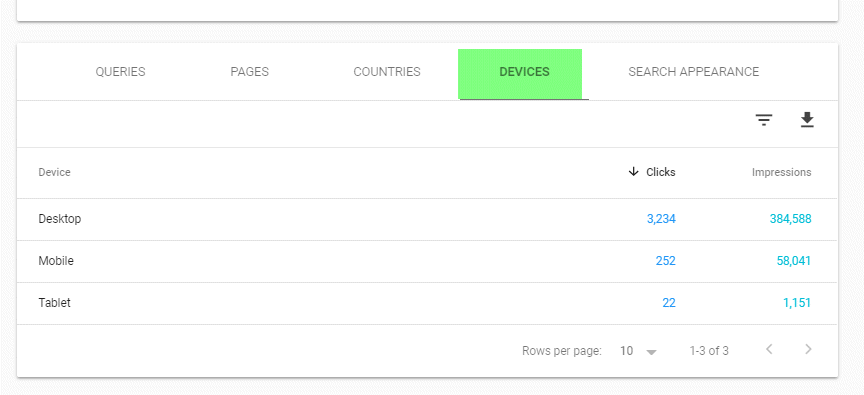
Differences between mobile and desktop search performance
Geographic differences in demand and visibility
Rich-result and structured-data problems
Sudden losses affecting a section, device, country or search type
New content themes emerging from real search behaviour
It is one of the core tools used within professional SEO services, but it is equally valuable for an informed business owner who wants to understand the source of organic growth.
How to Add Your Website to Search Console
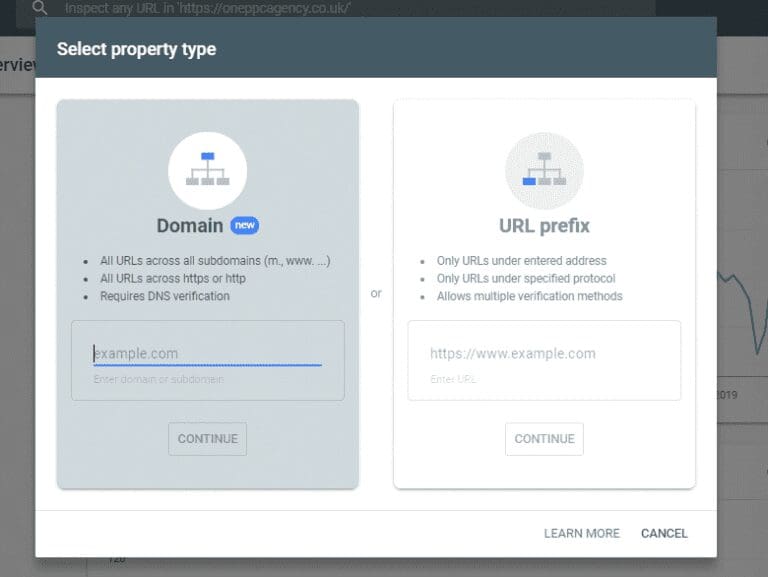
Open Search Console using the Google account that should own or manage the property, select Add property, and choose between a Domain property and a URL-prefix property.
Domain Property
A Domain property combines data across the domain’s protocols and subdomains. Adding example.com can therefore include versions such as:
https://example.comhttps://www.example.comhttp://example.comshop.example.com
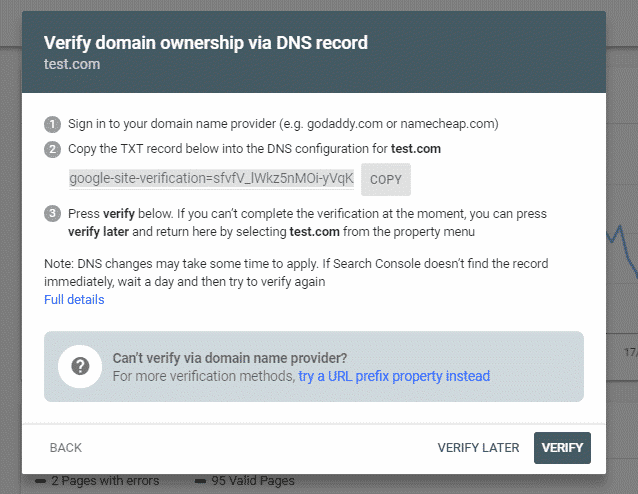
For most businesses, this is the best primary property because it provides the broadest view. It must be verified through a DNS record. The domain name is entered without https://, www or a path.
URL-Prefix Property
A URL-prefix property covers only URLs beginning with the exact prefix entered. For example, https://www.example.com/ does not automatically include http://example.com/ or another subdomain.
It supports several verification methods, which may include:
An HTML file uploaded to the website root
An HTML verification tag in the homepage
Google Analytics
Google Tag Manager
A DNS record
URL-prefix properties remain useful when access must be limited to a particular protocol, subdomain or directory, or when DNS access is unavailable.
Verification Is Required
The old article suggested that verification was optional. It is not. Google may already crawl a public website regardless of Search Console, but ownership verification is required before you can access private property data and management features.
Verification does not improve rankings. It proves that the user is authorised to view and manage the property’s Search Console information.
Use a company-controlled account as the verified owner and grant appropriate access to staff or agencies. Avoid leaving ownership dependent on one employee or supplier. Search Console distinguishes between owners, full users and restricted users, so permissions can reflect each person’s responsibilities.
Submit an XML Sitemap
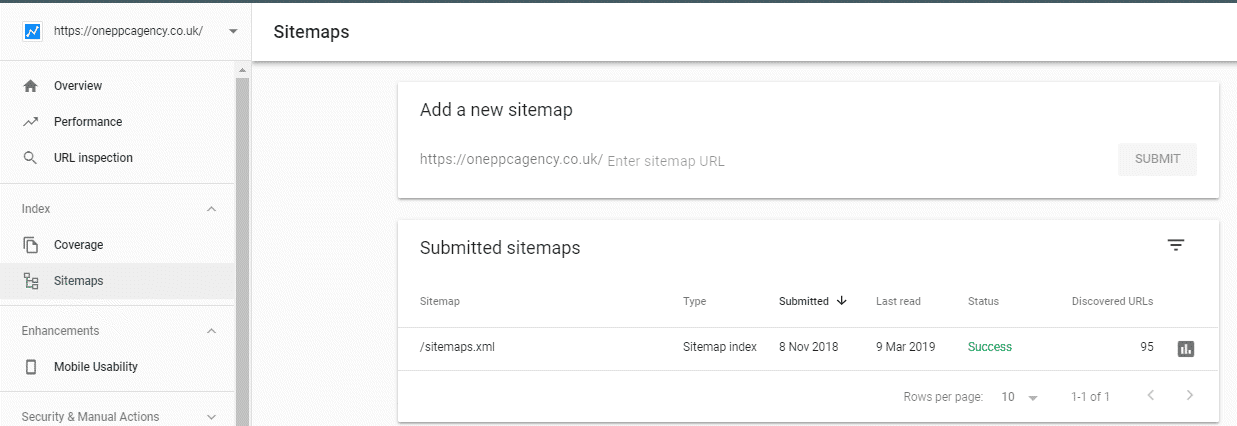
An XML sitemap lists the canonical URLs that you want search engines to discover. In Search Console, open Sitemaps, enter the sitemap URL and submit it.
Common WordPress sitemap locations include:
https://example.com/wp-sitemap.xmlhttps://example.com/sitemap_index.xml
The exact address depends on WordPress and the SEO plugin in use.
A sitemap is especially useful for large websites, new websites, ecommerce catalogues, news or media sites, and sites whose internal linking does not expose every important page clearly. The Sitemaps report also shows whether Google could fetch and parse the file.
It is important to set the right expectation: a sitemap helps discovery and monitoring, but it does not guarantee that Google will crawl, index or rank every submitted URL. Google can also discover pages through internal and external links without a submitted sitemap.
A good sitemap should normally contain indexable canonical URLs that return a successful status. It should not be filled with redirects, error pages, duplicate parameter URLs or pages carrying a noindex instruction. If the sitemap says a URL is important while the page or technical configuration says otherwise, Google receives conflicting signals.
Understand the Performance Report
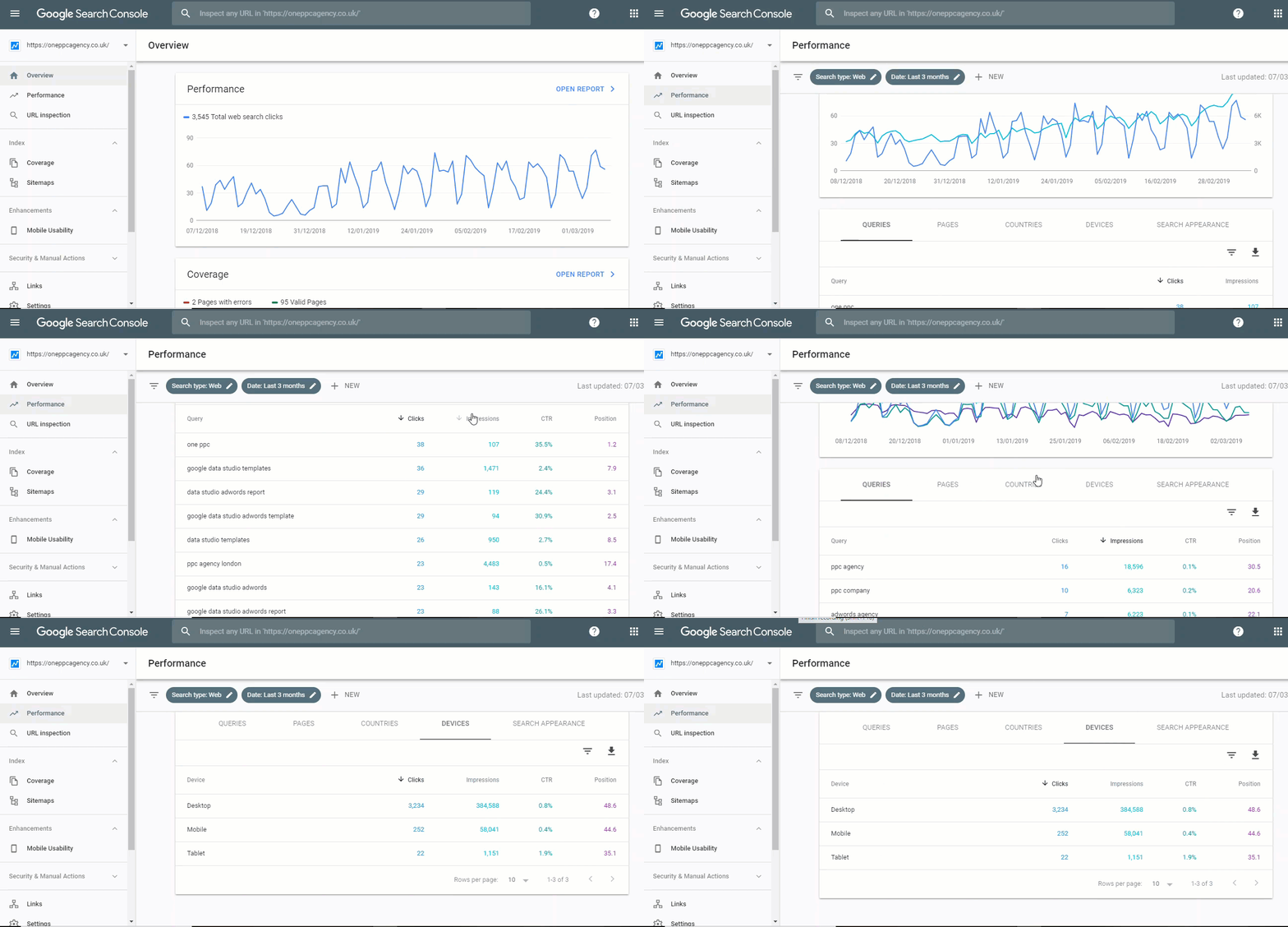
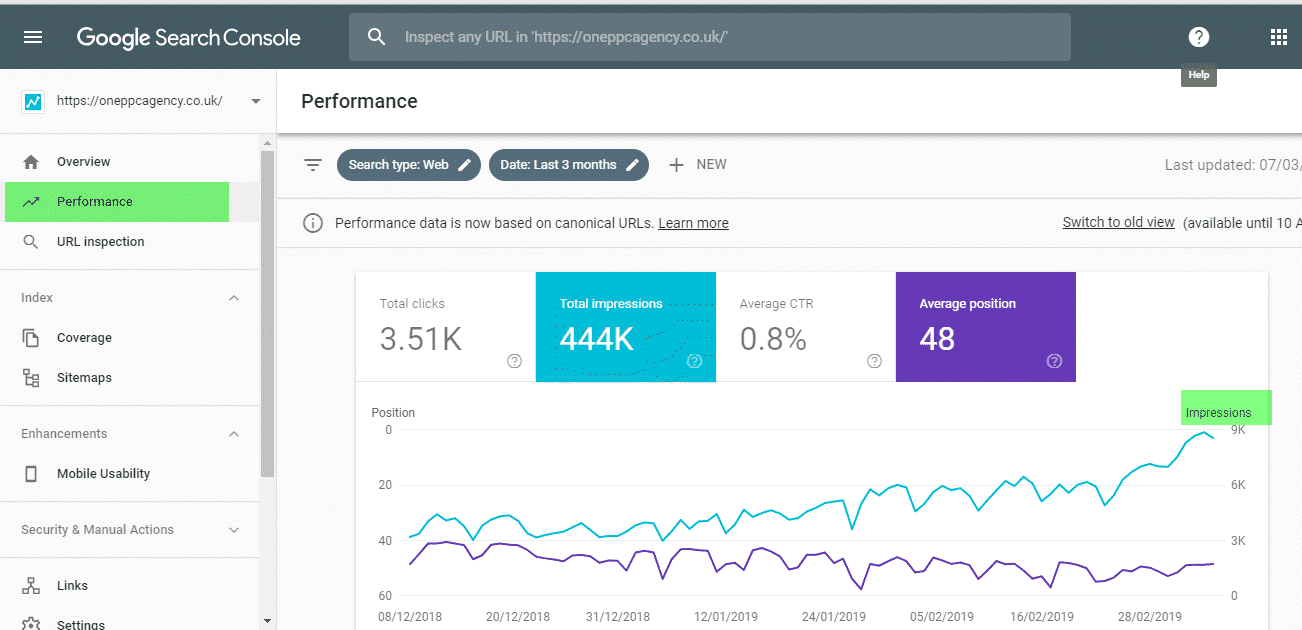
The Search results Performance report is where most SEO analysis begins. It reports four headline metrics: clicks, impressions, average click-through rate and average position.
The report can be broken down by query, page, country, device, date and search appearance. Search type filters can separate web, image, video and news performance where data is available. The recent 24-hour view uses hourly, preliminary data; longer periods can be viewed daily, weekly or monthly.
Clicks
Clicks broadly measure how often somebody clicked from a Google search result to a page outside Google.
Clicks are normally the most useful Search Console traffic metric, but they are not conversions. A page can gain organic clicks without producing suitable enquiries, sales or revenue. Compare Search Console with analytics and business outcomes before declaring a page successful.
Impressions
An impression is recorded when a result from the property is displayed or otherwise becomes eligible to be seen under Google’s rules for that search-result type. The exact counting rules vary across standard listings, carousels and other search features.
Rising impressions can be an early sign that Google is exposing a page for more queries, but they can also increase because demand grew or because the page began appearing in lower positions. Impressions should therefore be interpreted alongside clicks, position, query mix and search demand.
Average CTR
Click-through rate is clicks divided by impressions.
CTR is affected by far more than the wording of a title and meta description. It can change with:
Search position
Query intent
Brand familiarity
Competitor listings
Advert density
Featured snippets, maps, shopping results and other SERP features
Device type
Whether Google rewrites the displayed title or snippet
A falling CTR does not necessarily mean that SEO performance deteriorated. If a page expands from high positions on a small group of brand searches into lower positions across many non-brand searches, impressions can grow much faster than clicks. The CTR falls while total organic traffic rises.
Titles and descriptions should still be improved when the evidence supports it, but CTR should not be treated as an isolated ranking lever. Relevance, accuracy and user expectation matter more than chasing clicks with exaggerated wording.
Average Position
Average position is one of Search Console’s most misinterpreted figures. It is the average position of the property’s topmost result for the recorded impressions. It is not a fixed rank seen by every searcher.
The number can vary because of location, device, time, query wording, personal context and the search-results features present. It also averages across whichever queries, pages, countries and devices are included in the current view.
Use average position to analyse trends within carefully filtered segments. Do not report one site-wide average as though it were a precise keyword ranking.
Turn Search Performance Data into SEO Actions
The value comes from combining dimensions and comparisons rather than staring at four totals.
Find High-Impression, Low-CTR Opportunities
Filter for pages or queries with meaningful impressions and positions where a higher CTR may be realistic. Review the actual search results before changing anything.
Ask:
Does the page satisfy the dominant intent behind the query?
Is the title specific and useful rather than generic?
Does the result communicate a credible benefit or differentiator?
Is Google displaying the intended title and snippet?
Are rich results, maps, adverts or other features changing normal click behaviour?
Is the page ranking for a secondary query that it only partially answers?
Improving the page may be more important than rewriting its snippet. A weak content-intent match is not solved by a more aggressive title.
Find “Striking Distance” Content
Pages already receiving impressions outside the strongest positions may have more realistic growth potential than completely new topics.
Filter a page, review its queries and identify themes for which the content is relevant but incomplete. Possible improvements include:
Answering missing questions
Adding original examples, evidence or comparisons
Improving the structure and clarity
Strengthening relevant internal links
Updating outdated claims
Consolidating overlapping pages
Making the page’s primary purpose clearer
Do not add every query verbatim. Search Console queries are evidence of user needs, not an instruction to produce repetitive keyword-stuffed copy.
Compare Periods Properly
Compare equivalent periods and account for seasonality. A month-on-month comparison can be misleading when one month contains a holiday, a promotion, a news event or a different number of working days.
When clicks fall, separate the possible patterns:
Impressions down, position stable: demand or indexed coverage may have fallen.
Position down, impressions and clicks down: rankings or query exposure may have weakened.
Impressions up, CTR down, clicks stable: the site may be reaching broader or lower-position searches.
Position stable, CTR down: the search-results layout, competitors or query mix may have changed.
One directory falls: investigate that content type or template rather than assuming a site-wide problem.
These are diagnostic clues, not proofs. Confirm them with query, page, device and country filters, then inspect the live search results and any relevant site changes.
Separate Brand and Non-Brand Searches
Brand searches often rank highly and achieve a strong CTR, which can make overall metrics look healthier than non-brand discovery actually is.
Create a query filter or regular expression covering the company name, common misspellings and branded product names. Compare brand and non-brand performance separately.
This helps answer two different questions:
Are people already aware of the brand and searching for it?
Is the website earning visibility from people who do not yet know the business?
No filter will be perfect, especially where a brand name is also a generic word, but the split is usually more informative than one combined total.
Detect Content Cannibalisation Carefully
If several URLs receive impressions for the same important query group, inspect whether they genuinely compete for the same intent.
Multiple ranking pages are not automatically a problem. One may serve an informational search while another serves a transactional search. Action is justified when overlapping pages create confusion, fluctuate against one another or divide authority without serving distinct needs.
The solution may involve consolidation, clearer internal linking, stronger differentiation or canonicalisation. It is not always necessary to delete a page.
Use the Page Indexing Report
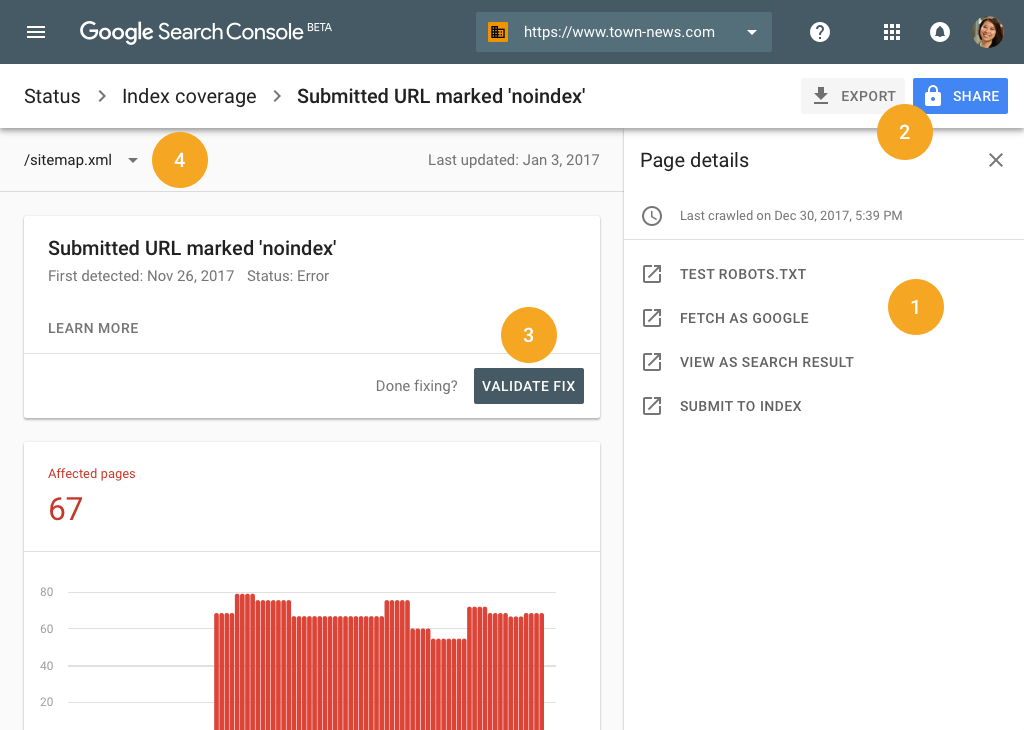
The former Index Coverage report is now the Page Indexing report. It shows the indexing status of URLs Google knows about, including indexed and non-indexed pages and the reasons associated with exclusions.
“Not indexed” does not automatically mean “error”. Many exclusions are intentional or harmless, such as:
Redirected URLs
Alternate pages with a valid canonical
Duplicate URLs where Google selected another canonical
Pages intentionally marked
noindexGenuine 404 pages
Problems arise when commercially or editorially important URLs are excluded unexpectedly. Common statuses worth investigating include:
Discovered – currently not indexed: Google knows the URL but has not yet crawled it.
Crawled – currently not indexed: Google fetched the page but did not add it to the index at that point.
Duplicate without user-selected canonical: Google detected duplication without a clear preferred version.
Google chose different canonical than user: Google’s preferred URL conflicts with the declared canonical.
Blocked by robots.txt: crawling is restricted, which may or may not be intentional.
Excluded by
noindex: the page explicitly tells compliant search engines not to index it.Soft 404: the URL returns a normal success status but appears to contain missing, empty or error-like content.
Server error: Google encountered a 5xx response or related availability problem.
Do not attempt to force every URL into the index. Faceted navigation, internal search results, duplicate archives, tracking parameters and thin utility pages may be better excluded. Focus on whether every page that deserves organic visibility is accessible, useful, canonical and internally linked.
Inspect Individual URLs
The URL Inspection tool shows Google’s recorded information about a specific page, including:
Whether the URL is indexed
When it was last crawled
Whether crawling and indexing are allowed
The user-declared canonical
The canonical selected by Google
Discovery information
Detected enhancements
The default result reflects Google’s indexed information. Test live URL fetches the current version and helps determine whether a problem has been fixed. These are different views: a live test can succeed while the indexed version still reflects an earlier crawl.
After publishing or materially updating an important page, you can request indexing. This places the URL in a recrawl queue; it does not guarantee immediate crawling, indexing or ranking. Repeated requests do not make the process faster.
For a small number of important URLs, inspection is useful. For large-scale discovery, use sound internal linking and XML sitemaps rather than manually submitting every page.
Monitor Core Web Vitals and Page Experience
The Core Web Vitals report groups similar URLs using real-world Chrome usage data where sufficient data exists. Its principal measures are:
Largest Contentful Paint (LCP): loading performance
Interaction to Next Paint (INP): responsiveness to user interaction
Cumulative Layout Shift (CLS): visual stability
The report classifies URL groups as Good, Needs improvement or Poor for mobile and desktop. Because it uses field data and grouped URLs, it is different from a one-off laboratory test in Lighthouse or PageSpeed Insights.
Core Web Vitals matter, but perfect scores do not guarantee high rankings. Google states that its systems consider multiple aspects of page experience and that there is no single page-experience signal. Prioritise serious usability problems, slow templates and unstable layouts, while preserving useful content and conversion functionality.
For paid traffic, the same principle has commercial consequences. A slow or confusing page can waste expensive clicks even when organic rankings are unaffected. Our guides to Google Ads Quality Score and the three factors behind Google Ads success explain the relationship between targeting, landing-page performance and campaign economics.
Check Structured Data and Search Enhancements
Search Console may display enhancement reports for supported structured data detected on the website, such as products, breadcrumbs or other eligible search features.
These reports help identify valid items, invalid items and warnings across groups of pages. Use them to find template-level problems, then test representative URLs with Google’s Rich Results Test and validate the fix in Search Console.
Valid structured data makes a page eligible for relevant rich results; it does not guarantee that Google will display them. Markup should accurately describe content visible to users and follow the requirements for that feature.
Absence from an enhancement report does not always mean the website has no structured data. Search Console reports focus on Google-supported search features and may not provide a universal schema audit.
Review Links without Overinterpreting Them
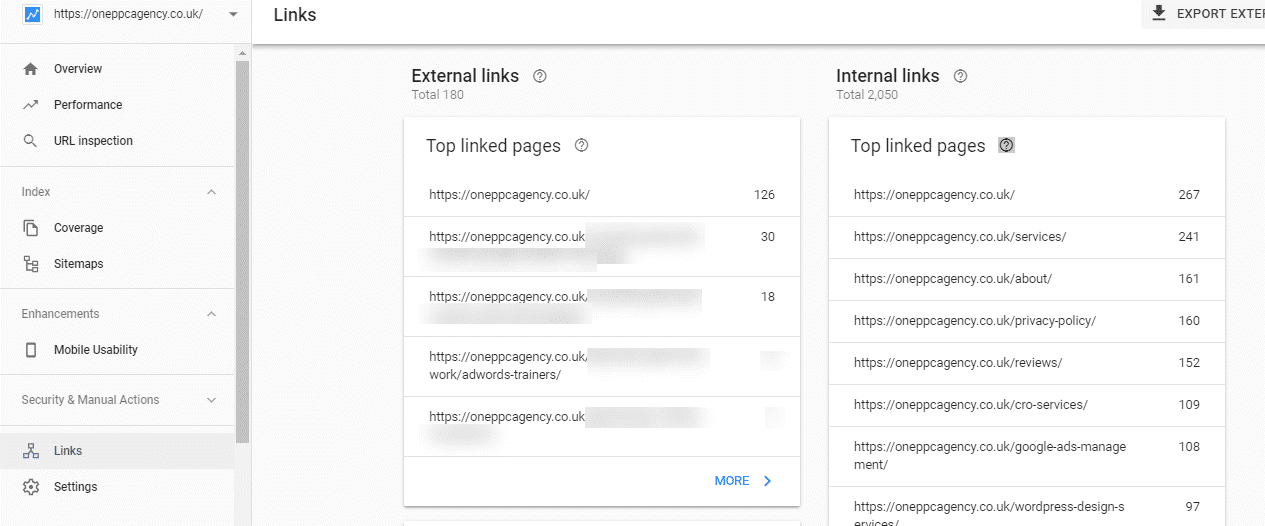
The Links report shows examples of external links, top linking sites, commonly linked pages and internal links.
It is useful for spotting broad patterns, but it is not a complete or real-time backlink database. A link missing from Search Console is not proof that Google has never found it, and a suspicious-looking domain in the report does not automatically mean the site has been harmed.
The report also does not provide a Google “domain authority” score. Third-party authority metrics are estimates created by SEO software companies, not Google ranking values.
Use the internal links section to identify important pages receiving little internal support. Use external-link data to understand which content naturally attracts references and to investigate unusual patterns. Do not disavow links merely because they look unfamiliar; Google’s disavow tool is an advanced measure mainly intended for significant unnatural-link issues, and careless use can remove signals that were helping the site.
Check Manual Actions, Security Issues and Removals
The Manual Actions report shows whether a human reviewer at Google has applied an action because pages appear to violate spam policies. This is different from an algorithmic ranking change.
The Security Issues report can warn about hacked content, malware, deceptive pages and harmful downloads. Both reports deserve immediate attention because they can affect visibility and user safety.
The Removals tool can temporarily hide eligible URLs from Google Search. It is not a permanent deletion method. For lasting removal, the underlying content must be removed or protected, or the URL must carry an appropriate noindex instruction and remain crawlable long enough for Google to see it.
Do not use robots.txt as a reliable way to remove an already indexed URL. Blocking crawling can prevent Google from seeing the noindex instruction or updated page status.
Understand Search Console’s Data Limitations
Search Console is extremely valuable, but it is not a complete record of everything that happened in search.
Important limitations include:
Some low-volume queries are anonymised for privacy and omitted from tables.
Chart totals can include data that does not appear in query rows.
Query filters can change totals because anonymised queries cannot be assigned to the filtered group.
The interface and normal spreadsheet exports provide representative rows rather than unlimited raw data.
Recent figures can be preliminary and may change.
Metrics follow Search Console’s aggregation and canonicalisation rules.
Search Console shows organic search interactions, not on-site engagement, lead quality or revenue.
For larger websites, the Search Console API provides more rows than the interface, while bulk export can send daily performance data to BigQuery. Google’s standard report export is limited to 1,000 representative rows; the API can expose up to 50,000 rows per day per search type, subject to its rules and limits. Bulk export is the strongest option for retaining detailed data at scale, although anonymised queries remain excluded.

Connect Search Console with GA4 and Looker Studio
Search Console and Google Analytics 4 answer different questions:
Search Console: How did the website appear and receive clicks in Google Search?
GA4: What did measured visitors do after arriving on the website?
CRM or ecommerce platform: Did those visits become qualified leads, customers and revenue?
Connecting Search Console with GA4 can make organic landing-page and query reporting more accessible, but the systems will not match perfectly. They use different definitions, attribution, time zones, privacy rules and processing methods.
Looker Studio can combine Search Console and GA4 reporting for easier monitoring. For larger organisations, BigQuery creates more flexibility for storing, segmenting and joining search data with other sources.
Avoid judging SEO solely by clicks or sessions. The commercial measurement chain should ideally connect visibility and visits with meaningful outcomes.
How Search Console Can Support Google Ads
Search Console is an organic search tool, but its data can improve paid search research when used carefully.
Discover Language and Search Intent
Organic queries reveal the language people use when Google considers the site relevant. This can inspire paid keyword research, advert messaging, landing-page content and new campaign themes. Combine it with Google Keyword Planner and the actual Google Ads Search Terms report rather than treating any single source as complete.
Identify Organic and Paid Coverage
If an important commercial query performs well organically, advertising can still provide incremental visibility, message control and protection against competitors. If organic visibility is weak, paid search can produce traffic while the business develops stronger content and authority.
The decision should consider incrementality, profitability and total search-results coverage rather than assuming that organic rankings make advertising unnecessary.
Improve Landing Pages
Search Console can reveal that a landing page also receives organic visibility for related questions. Those queries may expose gaps in the page’s explanation, proof or relevance.
Any changes should still protect the paid conversion journey. A page that ranks for many informational terms is not automatically the best destination for a tightly focused advert.
Do Not Copy Organic Queries Directly into Negative Keywords
The old article suggested using Search Console to identify Google Ads negative keywords. This requires far more caution.
Search Console reports organic queries for which the website appeared. It does not show which paid searches spent money, triggered a particular advert or produced advertising conversions. A query that is weak organically may still be valuable in paid search, and a high-volume organic query may be commercially irrelevant.
Use Search Console to understand themes and intent. Make paid negative-keyword decisions from the Google Ads keyword and search-term evidence, combined with conversion quality and business relevance.
Newer Search Console Features Worth Knowing
Search Console continues to develop beyond its older collection of reports.
Insights
The Insights report provides a simplified view of clicks, impressions, leading content, trending pages and query movements. Google is introducing it progressively, so availability may differ between properties.
It is useful for rapid content monitoring, but deeper analysis should still be completed in the Performance report where filters and comparisons provide more context.
Recommendations
Recommendations can appear on the Overview page when Google identifies an issue, opportunity or useful configuration change. They are optional, property-specific and subject to change.
Treat them as prompts for investigation rather than automatic instructions. Review the evidence and likely commercial effect before implementing a recommendation.
Generative AI Performance
Google is also testing a separate generative AI performance report with a subset of website owners. Where available, it reports impressions for supported generative search experiences, including AI Overviews and AI Mode, with breakdowns such as page, country, date and device.
This is a developing report and availability is limited. It should be interpreted as another visibility dataset, not proof that an AI impression generated a visit, lead or sale.
A Practical Search Console Routine
Search Console does not need to be checked obsessively every day. Google recommends periodic review and sends notifications for some new issues. A sensible routine depends on the website’s size, publishing frequency and commercial importance.
Weekly or Fortnightly
Review unusual changes in clicks and impressions.
Check recent performance after major content or technical releases.
Investigate important pages with sudden losses or gains.
Confirm that priority new content is discoverable and indexable.
Review notifications, security issues and manual actions.
Monthly
Compare brand and non-brand trends.
Review leading and declining pages.
Identify high-impression content opportunities.
Examine device and country differences.
Review Page Indexing changes by reason.
Check Core Web Vitals and structured-data trends.
Compare organic visibility with leads, sales and revenue.
After a Website Change
Confirm that analytics and Search Console access remain intact.
Test important URLs and templates.
Check redirects, canonicals,
noindexdirectives and robots rules.Submit or verify the current sitemap.
Monitor the Page Indexing and Performance reports.
Annotate the change externally because Search Console does not automatically know the business reason for every movement.
For paid search, a comparable discipline is covered in our Google Ads optimisation checklist and complete Google Ads guide.
Common Google Search Console Mistakes
Avoid these recurring errors:
Verifying only one URL-prefix version and missing another protocol or subdomain
Assuming sitemap submission guarantees indexing
Treating every excluded URL as a fault
Reporting average position as an exact rank
Evaluating CTR without position, intent or SERP context
Assuming every impression represents a clearly visible traditional blue link
Using Search Console clicks as a substitute for conversions or revenue
Expecting the Links report to contain every backlink
Requesting indexing repeatedly instead of improving crawl paths and content quality
Blocking a URL in
robots.txtwhile expecting Google to see itsnoindextagMaking changes based on a very short time period or tiny sample
Giving an external supplier permanent ownership instead of managed user access
Implementing every recommendation without independent review
Frequently Asked Questions
Is Google Search Console Free?
Yes. Google provides Search Console without a subscription charge. Implementation, technical fixes, analysis and SEO work may still require internal or external resources.
Does Search Console Improve Rankings?
Simply creating or verifying a property does not improve rankings. Search Console helps identify opportunities and problems. Rankings can improve when the resulting changes make the website more accessible, useful, relevant and technically sound.
Does Submitting a Sitemap Guarantee Indexing?
No. A sitemap helps Google discover URLs and lets you monitor processing, but Google decides whether to crawl, index and serve each page.
How Long Does Search Console Take to Show Data?
New properties do not normally display a complete history immediately. Data collection and processing take time, and the newest figures can be preliminary. Verification also does not cause Google to crawl every page at once.
Why Are Clicks Different from GA4 Organic Sessions?
Search Console measures clicks from Google Search, while GA4 measures website activity after its tag loads and applies its own session and attribution rules. Consent choices, blocked scripts, redirects, time zones and metric definitions can all create differences.
Is Average Position an Accurate Keyword Ranking?
It is accurate according to Search Console’s own definition, but it is an average of the topmost result for the selected impressions. It should not be interpreted as one universal ranking seen by every user.
Why Is an Important Page Not Indexed?
Inspect the URL and review its Page Indexing reason. Possible causes include discovery delays, crawl restrictions, noindex, duplication, canonical conflicts, soft 404 classification, server errors or insufficient value relative to other known pages. The correct response depends on the cause.
Can Search Console Show Leads and Revenue?
Not by itself. It reports organic search performance. Connect the analysis with GA4, ecommerce data, call tracking and CRM outcomes to measure commercial value.
Final Thoughts
Google Search Console is most valuable when treated as a diagnostic and decision-support platform rather than a scoreboard.
Use it to understand how Google discovers and indexes the website, which queries and pages generate visibility, where search performance is changing and which technical issues deserve attention. Then combine that evidence with analytics, conversion tracking and business outcomes.
The objective is not to maximise every Search Console metric. It is to attract more of the right searchers, lead them to useful pages and convert that visibility into measurable business growth.